Add-on guide · ৳75 a month
Floating Checkout: a floating cart and popup checkout for WooCommerce
This Nishchit add-on puts a floating cart on every page of your WooCommerce shop. From there customers order in a short form that opens over the page: name, mobile number, address and area. No trip to the checkout page.
A customer from a Facebook ad adds to cart on a phone, then gets the cart page, then a long checkout page. On a slow connection every new page is one more chance to leave without ordering. Floating Checkout keeps the customer on the page they are on. The order still goes through your real WooCommerce checkout, so delivery charges, payment methods and every Nishchit check work as before.
What you need: at least one payment method switched on in WooCommerce → Settings → Payments (usually cash on delivery), and your delivery charges set in WooCommerce's shipping zones or rates. The form does not make up charges; it reads them from there.
What the customer sees
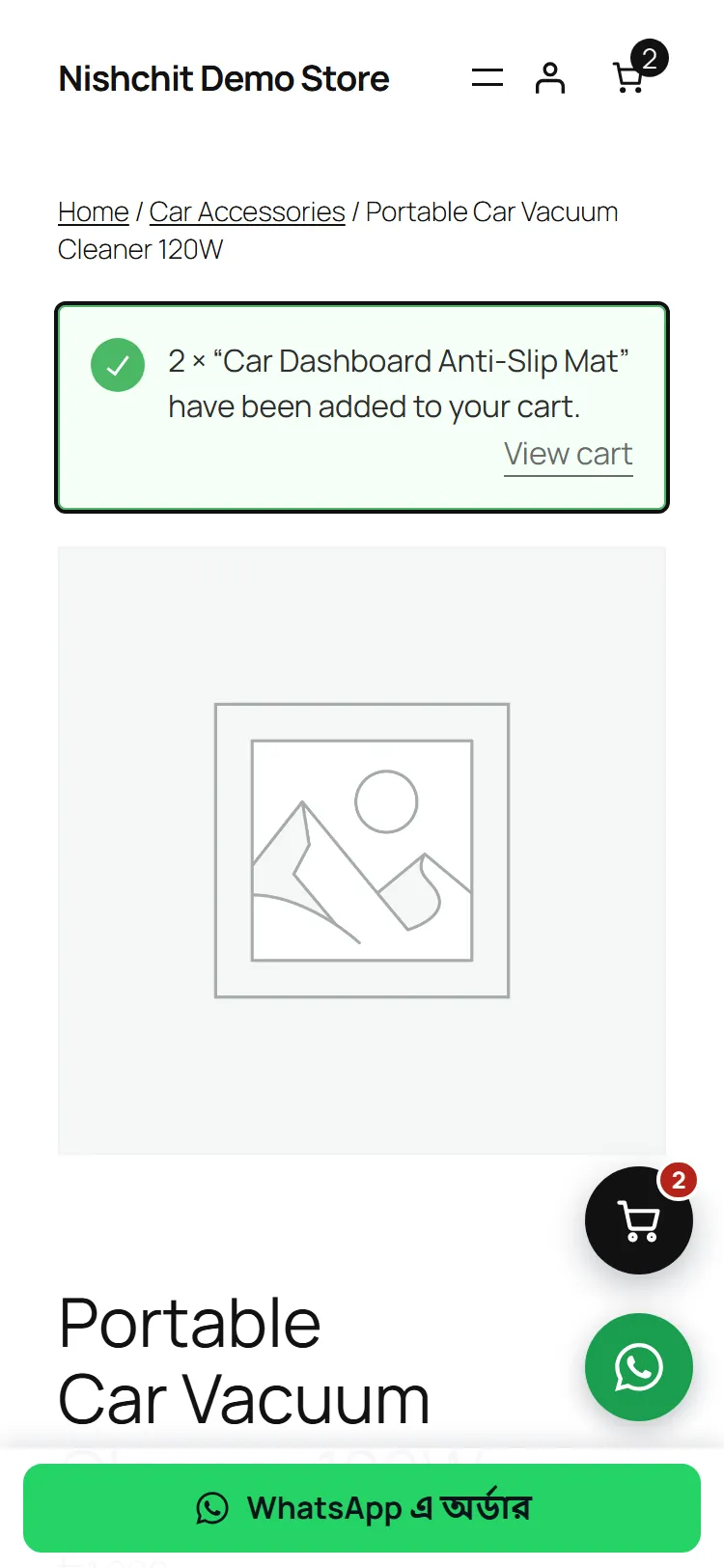
The cart, the drawer, the formThe floating cart button: a round cart button at the bottom right (or left) of every page, with the number of items in the cart on it. When a customer adds something to the cart, the drawer opens by itself. If WhatsApp Order's bottom bar or round WhatsApp button is there, the cart button moves up above it by itself.
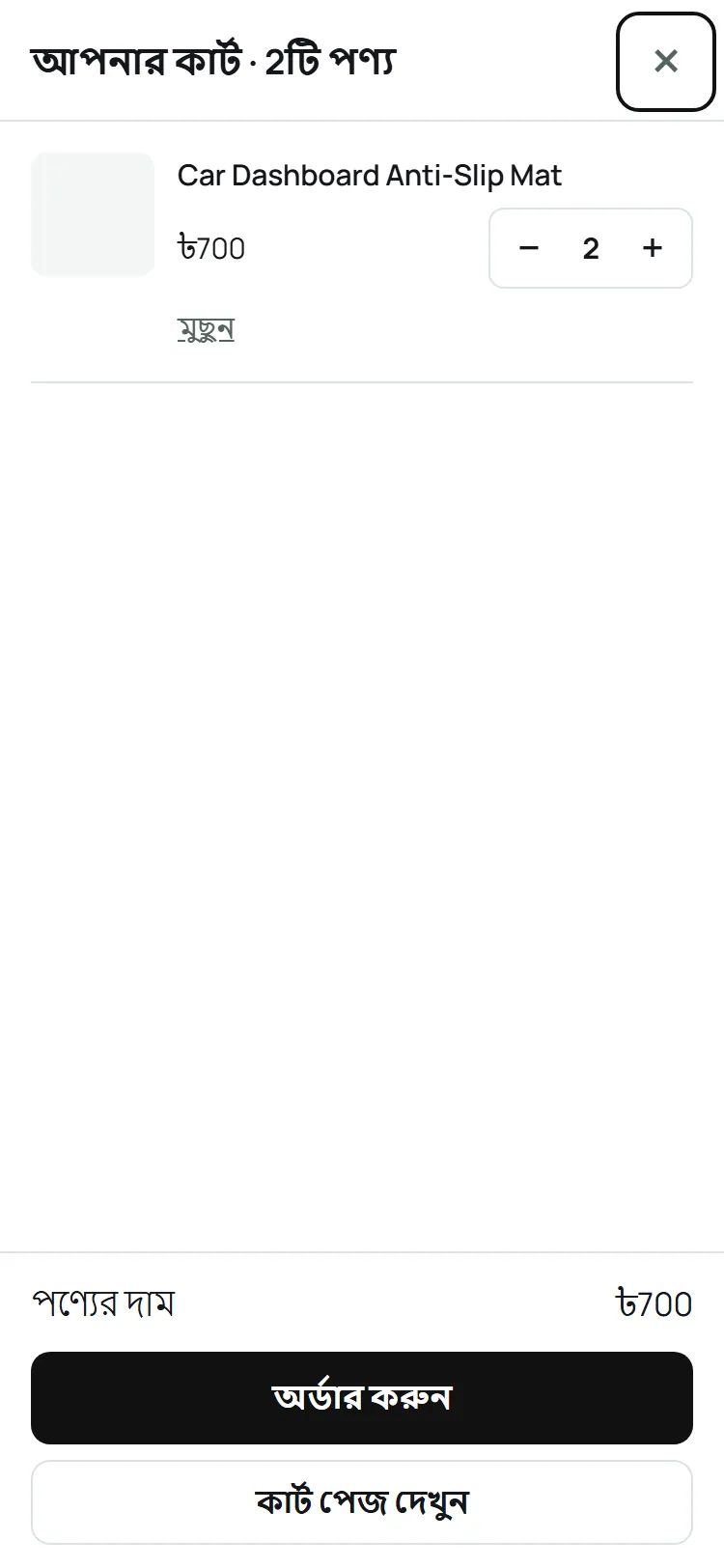
The drawer: pressing the button opens the cart from the right side. Each item's picture, name, size or colour and price, with buttons to change the quantity and “Remove”. A line removed by mistake comes back with “Undo”. More than the stock, or more than one of a product sold one at a time, cannot be taken. At the bottom the items' price, then two buttons: Order now and View cart page.
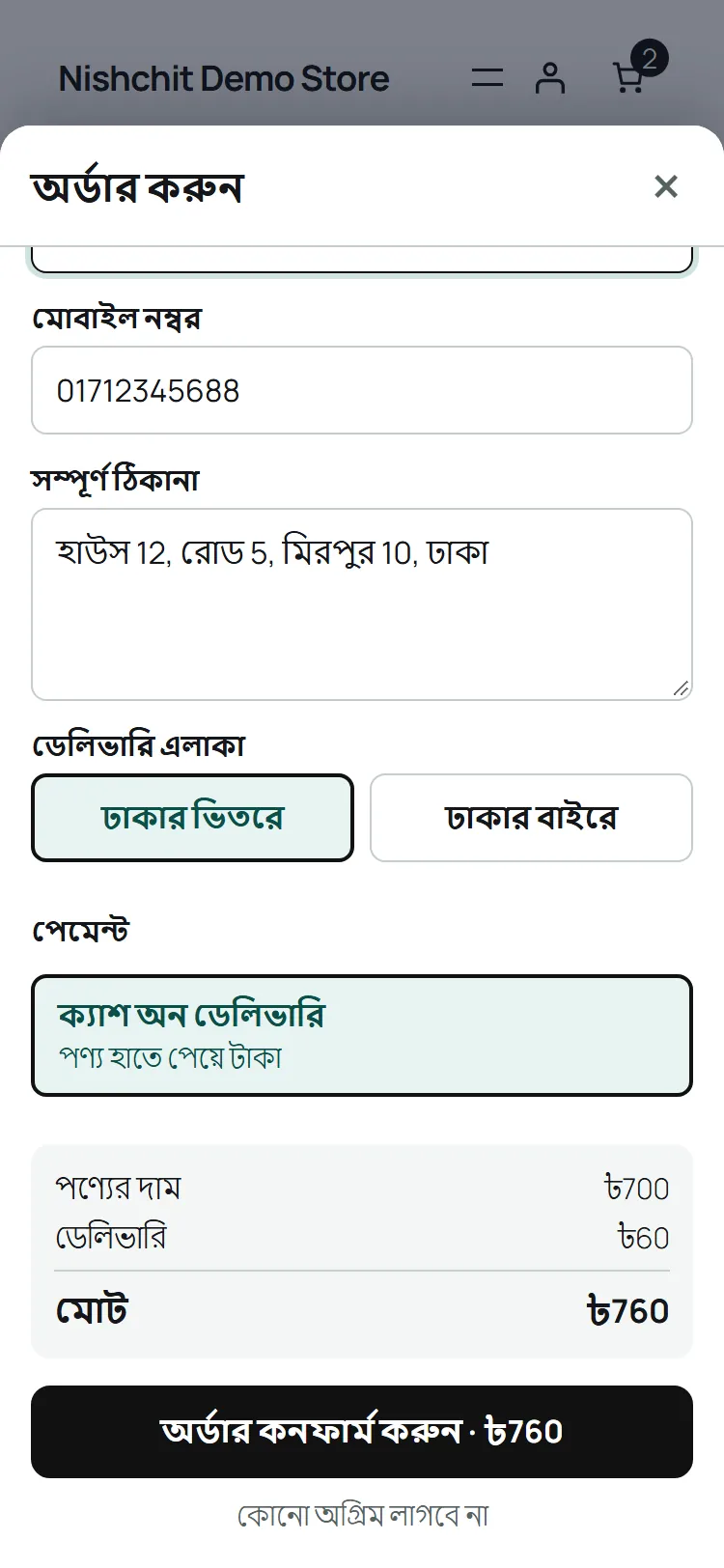
The popup checkout: “Order now” slides the form up over the page. At the top what is being ordered, then four fields: name, mobile number, full address and delivery area (inside or outside Dhaka). An email is never asked for and no account has to be made, whatever the checkout page requires.
As soon as the area is picked, the delivery charge and the total appear, and the total is written on the button itself: “Confirm order · ৳760”. With cash on delivery, the line under the button says “No advance needed”.
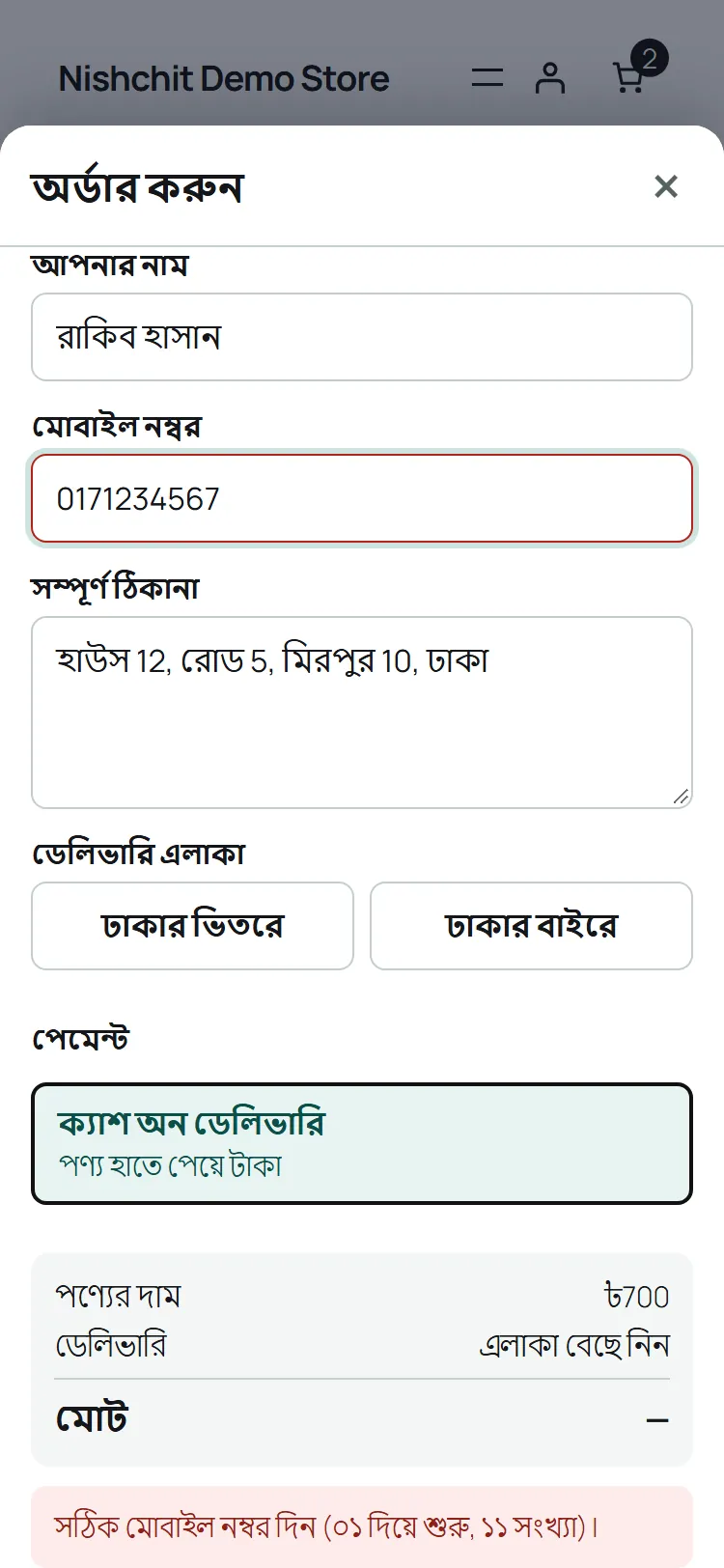
No area is picked in advance. Until the customer picks one, the delivery line says “Choose your area”, so nobody outside Dhaka is shown the inside charge. A wrong mobile number turns the box red with “Enter a valid mobile number (starting 01, 11 digits)”.
After the order: for a cash-on-delivery order the thanks shows inside the form: “Thank you! Your order is placed”, the order number, the items and the delivery charge, what to pay when the parcel arrives, and the number your agent will call. Below it “Continue shopping”, and “Track your order” if your shop has an order tracking page.
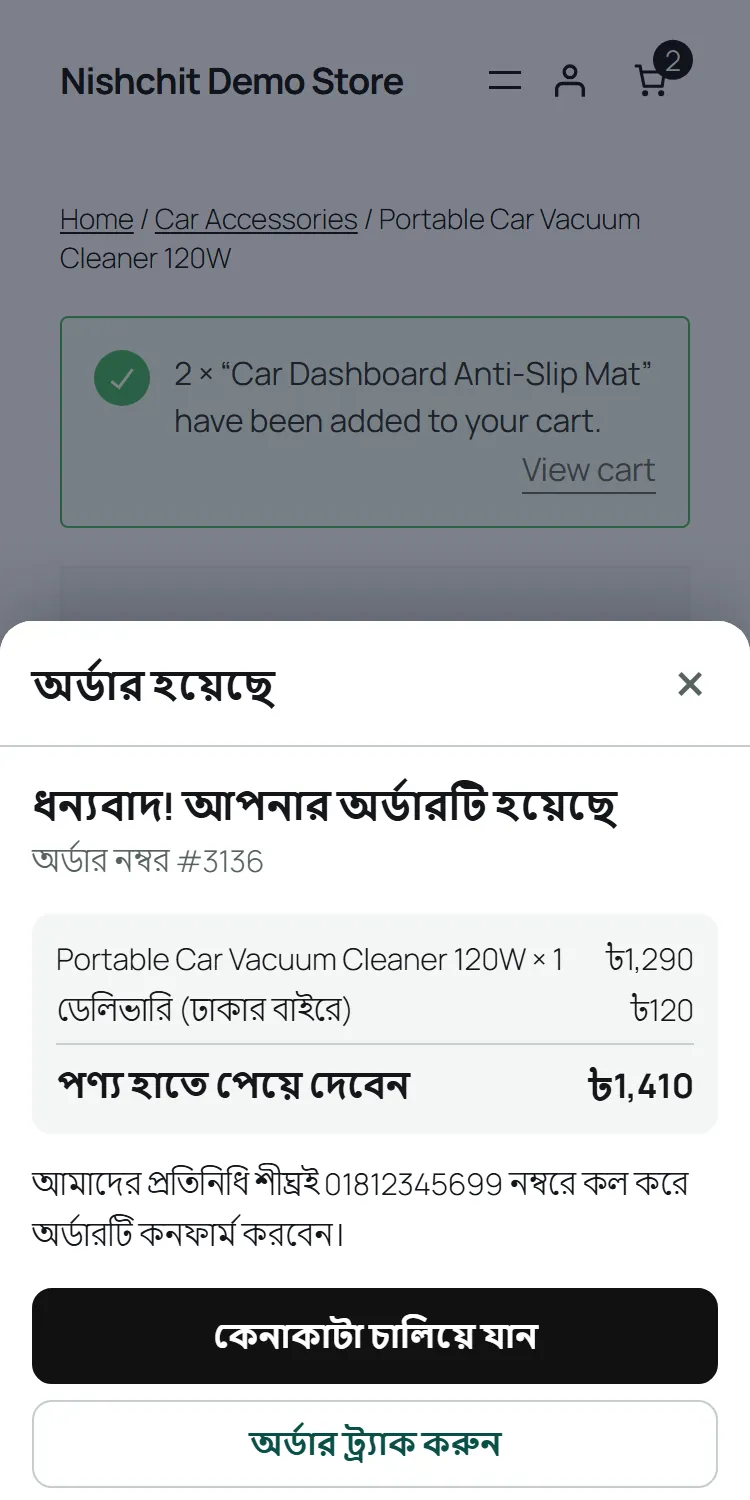
If the same customer presses the same order again from the same browser, no second order is made; within the duplicate guard's window the first order's thanks shows again. A matching number alone is not enough; the browser has to match too.
Your theme's Buy Now: pressing your theme's Buy Now button on a product page opens the same popup, for that product alone. Whatever was in the cart goes back into the cart after the order, and under the thanks it says “Your earlier 2 items are still in your cart”. With no size or colour chosen the popup does not open; the theme shows its own message.
- Online payment: a method that takes payment on its own page, such as bKash, Nagad or cards, opens that page after the order. A method with its own boxes to fill (a TrxID box, say) takes the customer to the checkout page.
- Advance: when Nishchit's order protection or a pre-order asks an order for an advance, the form says how much, the total, what is paid now and what is paid on delivery. The button reads “Order with a ৳100 advance”, and the payment page opens.
- Incomplete orders: if someone types a valid number and closes the form, it lands in the desk's Incomplete orders with the source “Popup checkout”, so you can call and take the order.
- Besides the form: the cart and checkout pages stay as they were. Anyone can still order through them.
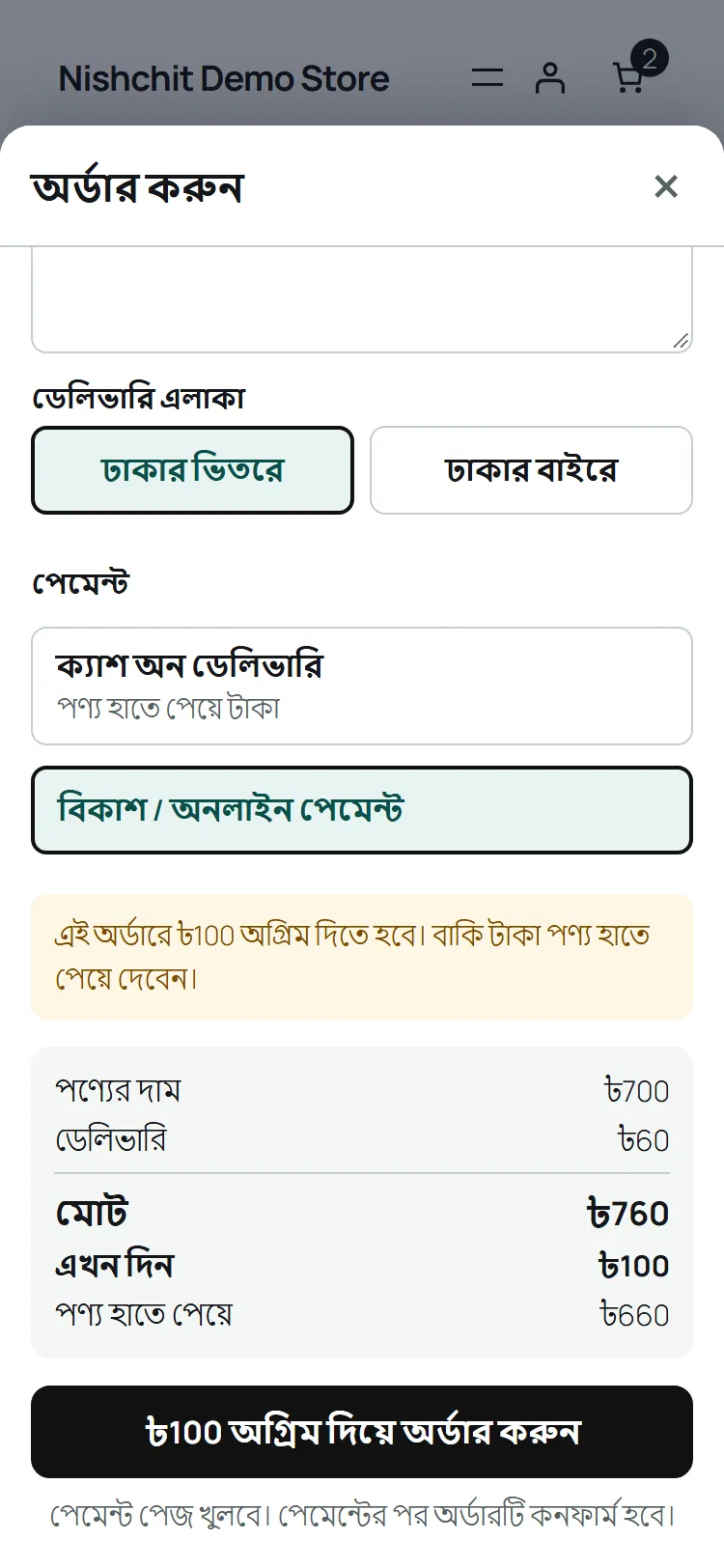
Everything customers see starts out in Bangla, as in the pictures; the form title, the button and the thank-you words can be changed in the settings (step 6 below). On this page their words are shown in English.
Setup
Steps 1–6-
1
Switch the add-on on
On the Nishchit → Add-ons page, switch on the Floating Checkout card and save, then press Open settings. The add-on's own page has a switch at the top too, which also turns it on and off. Off, nothing of it is left in the shop: no button, no form.
It works on the starting settings. After changing something and saving, purge your site's page cache (WP Rocket, LiteSpeed and so on) so cached pages get the new settings too.
-
2
The cart: ours, or your theme's
Cart on your pages: «Our floating cart» to start with. If your theme has its own side cart, choose «Keep my theme's cart, add the order button to it», so two carts never show. Then there is no floating button; the theme's mini cart gets an “Order now” button that opens the same form.
With WoodMart, Flatsome or Elementor Pro's menu cart, a note at the top of the page says what to do. With WoodMart, for example, using our cart means setting WoodMart → Theme Settings → Shop → “Action after add to cart” to “No action”.
Button position: bottom right (to start with) or bottom left. And two ticks, both on to start with: Open the cart after Add to cart, and Show the free delivery line (Offers).
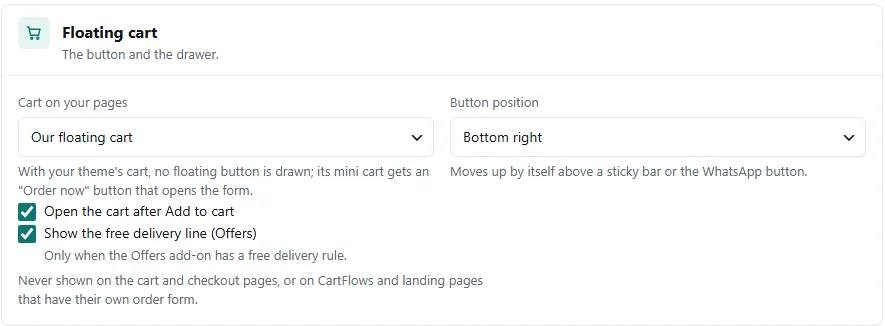
The “Floating cart” panel: which cart, the button position and two ticks -
3
Where the form opens from
Opens from: The cart's Order button is ticked to start with; “Order now” in the drawer (or the theme's mini cart) opens the form. Untick it and the drawer has no “Order now”, only “View cart page”; the theme's mini cart gets no button either.
The second tick is Buy Now buttons, on to start with. If your theme has its own Buy Now button (WoodMart's, for example), pressing it opens the popup for that product instead of the checkout page. Whatever was in the customer's cart is set aside and comes back after the order. Untick it and the theme's Buy Now works as before.
With Nishchit's own free Buy Now add-on on, its “Order now” button opens the popup through this same tick, on cards and on product pages.
“Every link to the checkout page” carries the label Coming in P2: that does not work yet.
The buttons it knows: WoodMart's Buy Now, and a few common Buy Now buttons of other themes and plugins inside the product form. If your theme's button does not open the popup, tell us; a developer can add it with the nishchit_floating_theme_buy_now filter.
To open the drawer from your own button or menu, link it to #nishchit-cart, for example on an Elementor button or a menu item. Pressing it opens the cart without leaving the page.
-
4
What the form asks
Delivery area question: three ways. «Inside / outside Dhaka», two buttons, to start with; or «A district list»; or «Do not ask». The charges come from WooCommerce, so they work best set up in one of these two ways:
By zoneOne shipping zone for Dhaka district and another for the rest of the country. “Inside Dhaka” gets the Dhaka zone's charge, “outside” the other one.
By rate nameTwo rates in one zone, named “inside Dhaka” and “outside Dhaka” (in Bangla or English). The customer's answer picks the rate by its name.
When neither matches, the customer sees the rates in the form and picks one.
Ask for an order note: off to start with. Four fields bring the most orders; switch it on only if you need it.
-
5
Payment, and after the order
Payment methods in the form: a tick beside every method switched on in WooCommerce, all of them to start with. Under each it says what happens after the order: thanks inside the form for a method paid at the door, its payment page for a payment-page method, and the checkout page for a method that needs its own boxes. Untick any you do not want in the form. A method order protection takes away from a customer is not in the form either.
After the order: «Thank the customer inside the form» to start with. If another plugin (PixelYourSite or Google Tag Manager, say) counts sales on the thank-you page, choose «Go to the thank-you page». Nishchit's own Meta Purchase is sent from the server either way.
-
6
Your words and colour
What the customer reads: five texts, each box showing its starting words in grey. A box left empty keeps the starting words.
Form heading“Order now”
Order button“Confirm order”, with the total added after it.
Under the button“No advance needed”, shown only while cash on delivery is chosen and no advance is due.
Thank-you heading and line“Thank you! Your order is placed”, and “Our agent will call you soon on {phone} to confirm the order.”
Words in braces are filled in by themselves: {order_number}, {total}, {cod}, {phone}, {name}.
Digits for money and phone numbers: Latin digits (1,059) to start with, matching courier slips and SMS; Bangla digits (1,059) if you prefer. The setting is shared with the WhatsApp Order form. Colour: matched to your theme to start with, read off its Add to cart button; or a colour of your own. A light colour is darkened until white words read on it.
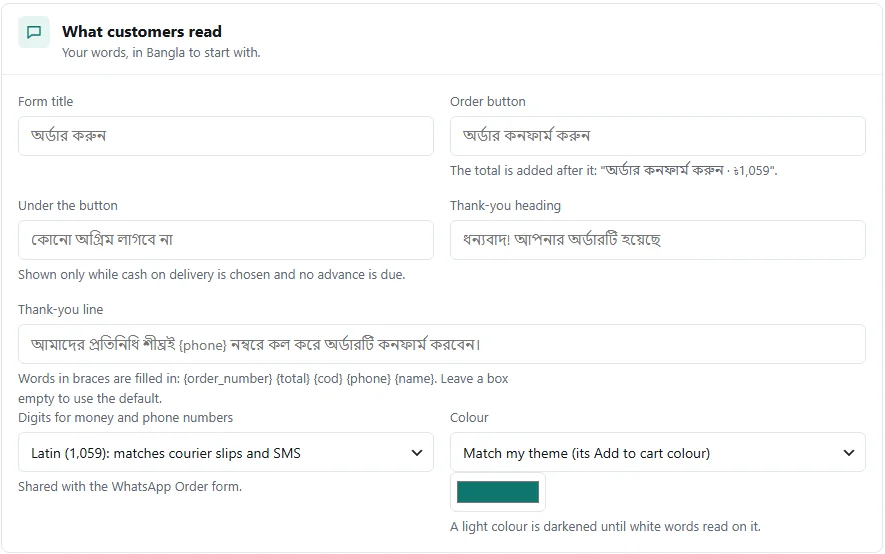
The “What customers read” panel: five texts, digits and colour
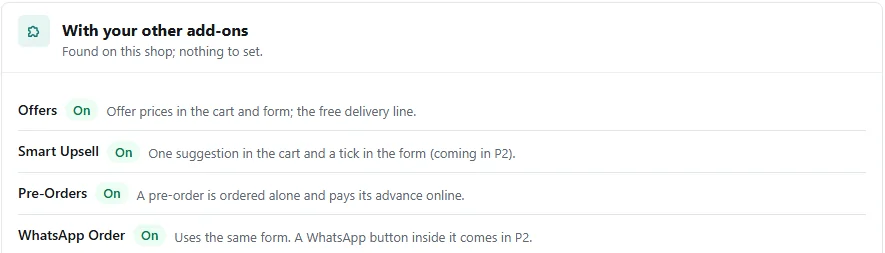
With your other add-ons
Nothing to setNear the bottom of the settings page, the With your other add-ons section shows which of them are on in your shop and what each does with the form. There is nothing to set.
Both use the same form: the same fields, the same area question, the same digits setting. The cart button moves up above WhatsApp Order's bottom bar and round button, so neither hides the other. WhatsApp Order's own payment method does not show in the popup. There is no WhatsApp button inside the popup yet.
Offer prices show in the drawer and the form, because the form checks out the real cart. The offer line under the item, “You save” above the total, and, when Offers has a free delivery rule, “Spend ৳… more for free delivery” in the drawer with a bar.
No Smart Upsell box shows in the drawer or the form yet. “Frequently bought together” on the product page works as before; if a customer ticks products there and then presses the theme's Buy Now, the ticked products come along, and the popup orders the whole cart with them. “Add to the same parcel” shows on the thank-you page; with the thanks inside the form the customer never reaches that page, so if you want it, choose «Go to the thank-you page» in step 5.
A pre-order product goes in an order of its own and pays its advance online: the form opens the payment page, and cash on delivery is not offered.
The numbers
Last 30 daysHow many times the popup form was opened.
How many people typed a valid mobile number, each number once.
How many orders came from the form.
How many of them came from a Buy Now button.
Opens to numbers, numbers to orders: the three side by side show where customers stop. Orders from the form come in as ordinary website orders, so nothing changes in Nishchit's other reports or the desk.
Tips
What works- Exclude two files in your speed plugin. Exclude floating.js and order-sheet.js from “Delay JavaScript”, and keep .nfc- and .nsh- in the “Remove unused CSS” safelist. Otherwise the first press cannot open the cart and takes the customer to the cart page.
- Page caches are fine. The page is the same for everyone; the cart count is read from WooCommerce's cookies after the page opens. A visitor with an empty cart makes no extra request at all.
- Two carts showing? See step 2. To keep your theme's own side cart, choose «Keep my theme's cart».
- Keep the fields few. Leave the order note off unless you need it; four fields bring the most orders.
FAQ
Floating CheckoutIs an order from the popup a real WooCommerce order?
Yes. The form posts to WooCommerce's own checkout, so the order, stock, delivery charge and payment are all as on the checkout page. Nishchit's checks run too, such as the device block, VPN Shield, the duplicate guard, the blacklist and the advance.
Are customers asked for an email?
No. The form asks only for name, mobile number, address and area. Even if your checkout page requires an email or other fields, this form does not, and no account is made.
Can a customer outside Dhaka see the wrong charge?
No. No area is picked in advance; until one is, the total says “Choose your area”. The charges come from your WooCommerce shipping zones or rates.
Why is there no button on the cart and checkout pages?
On purpose. Those pages are the cart and the checkout already, so the floating button stays off them. It also stays off CartFlows pages and landing pages that have their own order form.
Does Buy Now open the popup?
Yes, your theme's own Buy Now button does, when the Buy Now buttons tick is on in the settings (it is to start with). The popup orders that product alone; the rest of the cart is still there after the order.
The “Order now” button of Nishchit's free Buy Now add-on opens the same popup, from product cards too.
What if a customer closes the form and leaves?
If a valid number was typed, it lands in the desk's Incomplete orders with the source “Popup checkout”, and you can call and take the order. Whatever was in the cart stays there too.
Price: This add-on is ৳75 a month. Three or more add-ons cost ৳199 in all. The first payment covers only the days left until the licence renews; after that it comes with the renewal bill. How billing works
Add-ons run with a Nishchit WooCommerce plugin licence. No plugin yet? see the licence prices, or start with the 7-day trial.