Add-on guide · ৳75 a month
WhatsApp Order: the WooCommerce order first, then WhatsApp
In Nishchit's WooCommerce WhatsApp order plugin, pressing “Order on WhatsApp” first makes a real order in your shop, with every check. Then WhatsApp opens with a message carrying the order number already typed.
Many customers skip the form and write “price?” on WhatsApp. An order made by hand from there has no ad tracking and no duplicate or fraud check. WhatsApp Order works the other way round: the order is made first, through your own checkout, and the talking happens on WhatsApp afterwards.
What you need: at least one WhatsApp number. The delivery charge comes from your WooCommerce delivery rates, so naming the rates “Inside Dhaka” and “Outside Dhaka” makes it simplest.
What the customer sees
From button to WhatsAppOn the product page, an “Order on WhatsApp” button under Add to cart, with “Chat for details” beside it. On phones a bar stuck to the bottom of the page, a round floating button on every page except checkout for a plain chat, a button on the cart page for the whole cart, and a payment method at checkout: “Order on WhatsApp (cash on delivery)”.
Pressing the button opens the order form over the page, sliding up from the bottom on phones — since 1.6.55 it is the very card Floating Checkout's popup uses: the product card and a quantity stepper at the top, then name, mobile number, full address and delivery area (inside or outside Dhaka). Below, a summary card with the product price, delivery and total, “You pay when the parcel reaches you (cash on delivery)”, and the green button “Order and go to WhatsApp” with the total on it. Under the button, a line saying order updates will come to this WhatsApp. On a computer the form comes in two columns.
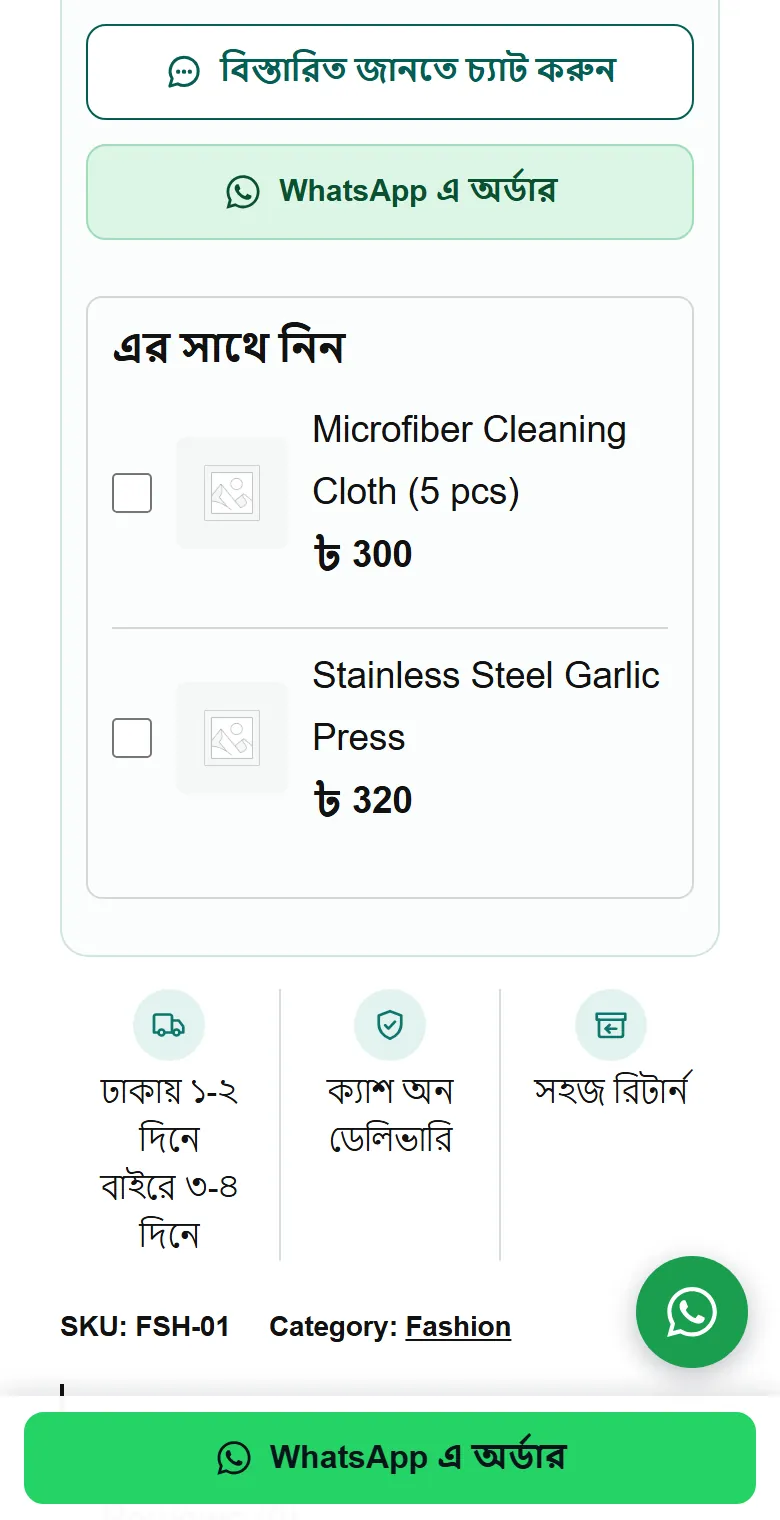
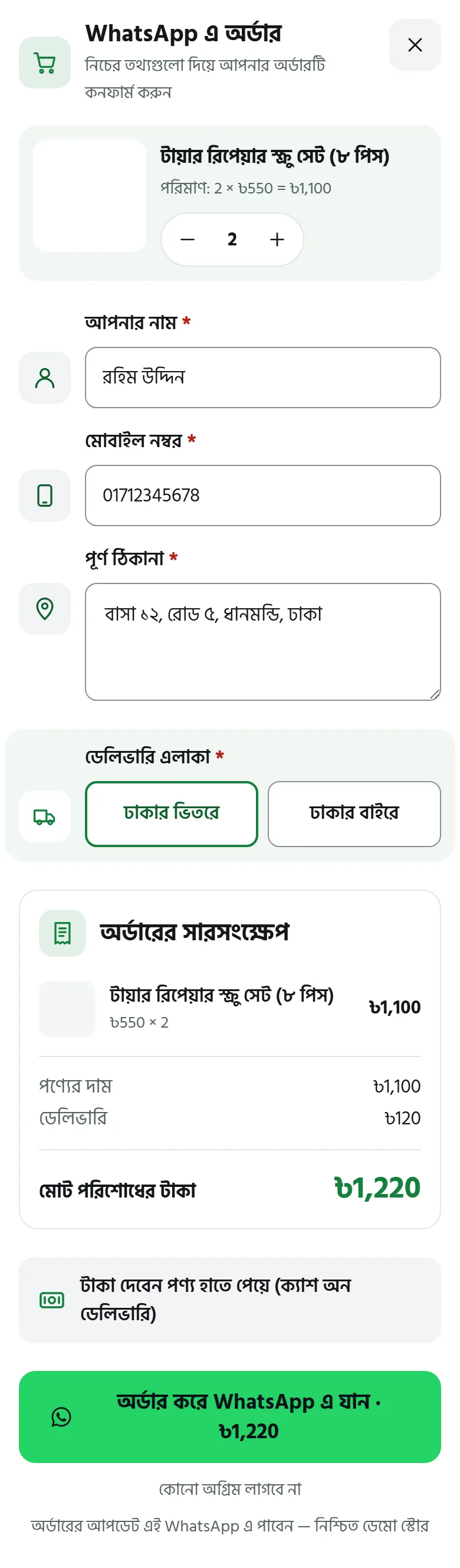
Pressing it makes the order through your real checkout, so every check switched on in your shop runs: duplicate order, fraud, the number-check code, advance. Then the thank-you page, “Order #N received”, and on a phone WhatsApp opens by itself after about a second with this message typed in (the default text, sent in Bangla; shown here in English):
WhatsAppAssalamu alaikum. I would like to confirm order #1234.
Tyre repair screw set × 2 — ৳1,100
Delivery — ৳120
Total — ৳1,220 (cash on delivery)
The customer only presses Send. On a computer the thank-you page shows a QR code; scanning it with the phone's camera opens the phone's WhatsApp with the message. A customer without WhatsApp sees on the page that the shop will call to confirm.
The product-page button orders that product alone; whatever was already in the customer's cart goes back into the cart after the order.
What customers see starts out in Bangla, and the button text and the message can be changed in the settings. On this page their words are shown in English.
Setup
Steps 1–6-
1
Switch the add-on on
On the Nishchit → Add-ons page, switch on this add-on's card and save, then press Open settings. The add-on's own page has a switch at the top too, which also turns it on and off.
No button shows anywhere until at least one number is added and switched on.
-
2
Add your numbers
In the “Numbers and hours” section, press “Add a new number”. Up to 12 numbers, each on its own card:
WhatsApp numberAny Bangladeshi mobile number; Bangla digits work too.
Assign orders toWhich staff member the orders on this number go to. Default: nobody.
Weight / priorityDefault 1. Set 2 and this number gets twice as many turns as the others.
Days of the weekNo day picked means every day.
HoursStart, end and break times. No times means all day.
CategoriesTakes orders only from certain categories. Left empty, every product.
The name box on the card is, for now, only used to tell numbers apart in this page's report. Switch a card off and that number gets no more orders or chats. Pressing Test message opens that number's WhatsApp in your own browser, so you can check the number is right; it sends nothing by itself.
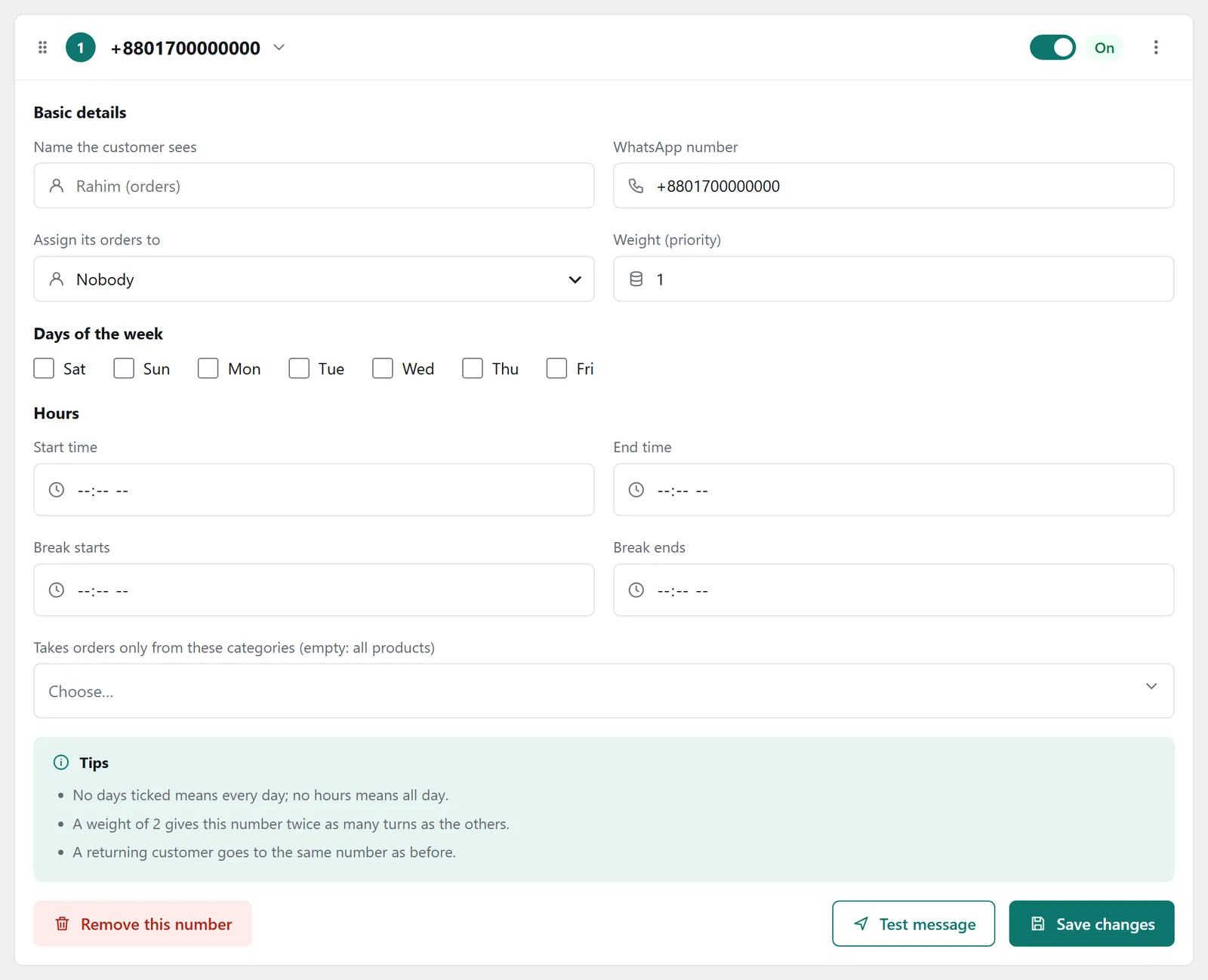
A number's card: number, staff member, weight, days, hours and categories Which number gets it: first, numbers whose categories match the order's products; then, those within their hours right now. A returning customer goes back to their earlier number. Everyone else takes turns, by weight.
-
3
Where the button shows
On the product pageBeside Add to cart. On.
Sticky bar on phonesAt the bottom of the product page, on screens up to 768 pixels wide. On.
On the cart pageOrders the whole cart. On.
Round floating buttonOn every page except checkout, for a plain chat without an order. On.
Payment method at checkoutOn both the standard and the block checkout. On.
On shop and category page cardsOff.
A few more ticks, all off to start with: a “Share on WhatsApp” link, hiding Add to cart wherever the WhatsApp button shows, and hiding the buttons on computers so they show only on phones. You can also keep the button to some categories, or never show it in some; that rule applies to the product page, the phone bar and shop cards.
Button text defaults to “Order on WhatsApp”. Choose a colour: WhatsApp green, dark teal, or outline only; or your own colour.
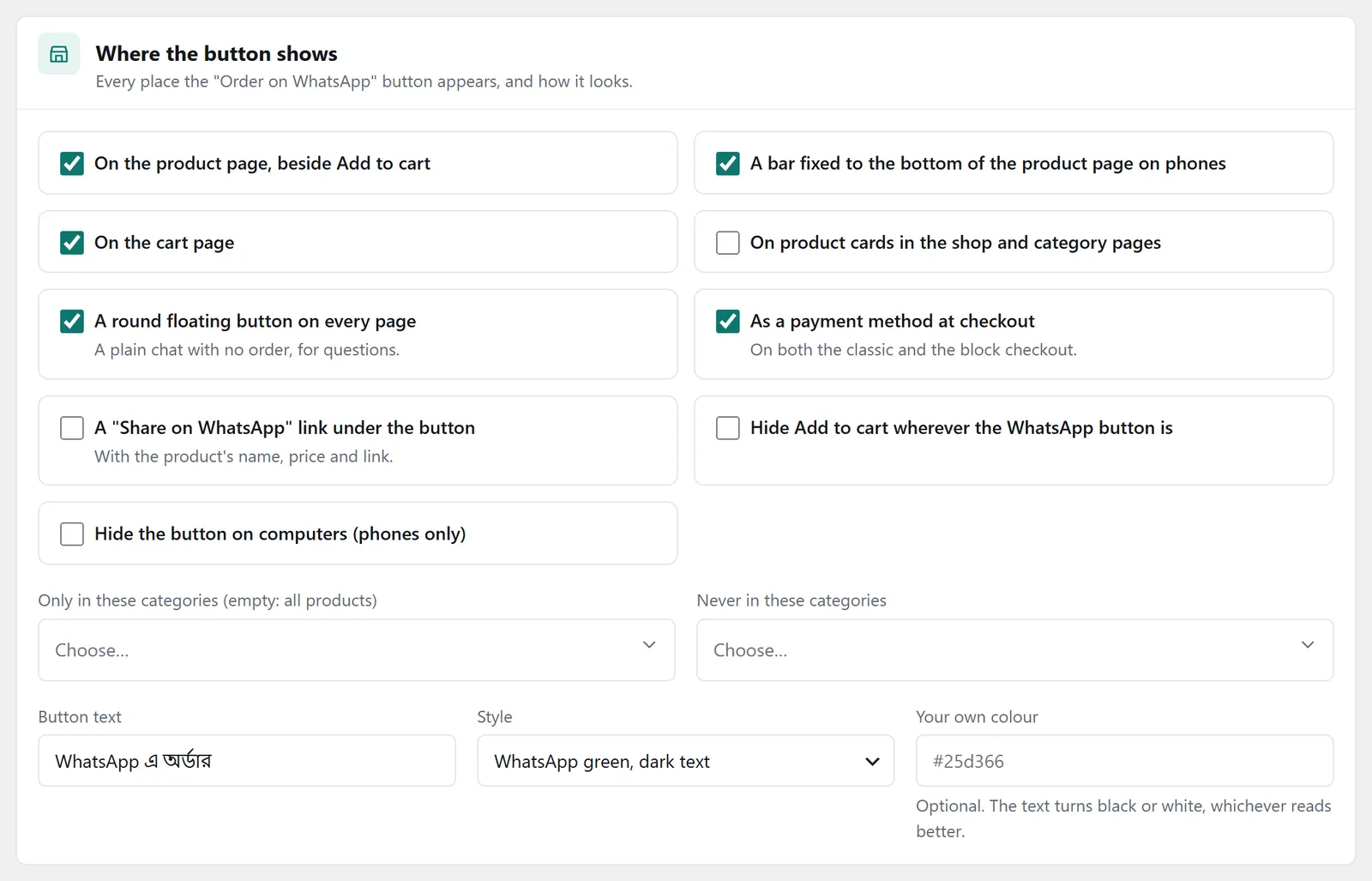
The “Where the button shows” panel: product page, phone bar, cart, floating button and checkout -
4
The form and the message
The delivery area question: defaults to “Inside Dhaka / Outside Dhaka”. Or a list of the 64 districts, or no question and a choice from your delivery rates. With rates named “Inside Dhaka” and “Outside Dhaka” (in Bangla or English), the answer picks the right rate by itself.
The message the customer sends: the default text, like the sample above. You can change it; available tags: {order_number} {items} {delivery} {subtotal} {total} {payment} {name} {phone} {address} {district} {product} {qty} {link} {shop} {note}. A line whose tags are all empty is dropped. With a big cart the message stays within 1,000 characters, ending with “N more items” and the order link.
Two ticks: “Also put the name, phone and address in the message” (off, because the order has them anyway) and “Order number, prices and quantities in Bangla digits” (on). The floating button's chat text and the checkout payment method's name and description are changed here too.
-
5
When nobody is online
When no number is within its hours defaults to taking the order and saying when you will reply. That is the recommended choice. In the form, after the order and in the message, the customer sees “We will reply tomorrow at 10 am — your order is in.” The other two choices hide the order buttons outside hours; the chat button stays.
“On computers” shows the QR code first by default, because most customers have WhatsApp only on their phone. The “Number to call” is shown after the order to customers without WhatsApp; left empty, it is the number the order went to. “Returning customers go to the same number” defaults to 30 days.
The hours are checked when the page opens. The checkout payment method stays available outside hours too.
-
6
Status and follow-up
Orders start in their own status, WhatsApp pending, with their own tab on the desk. If the status is missing, the page shows a button to create it. Its name or colour can be changed under Order statuses.
Follow up after this many minutes defaults to 30: if the order is still WhatsApp pending by then, one follow-up. If the shop has AI Call, the call goes then rather than the moment the order arrives (on). An SMS too if you like (off, from your SMS balance). Finally, press “Save all changes”.
After the order
On the deskOn the order desk, orders gather in the WhatsApp pending tab. Each row has a green dot and the word WhatsApp, with two buttons beside it: “Chat” opens WhatsApp to that customer's number, and “Confirm” moves the order to your Confirmed status in one press. If a staff member is set on the number's card, the order arrives in their name.
Nishchit never sends anyone a WhatsApp message by itself. The message goes from the customer's own WhatsApp, and you or your staff reply.
The numbers
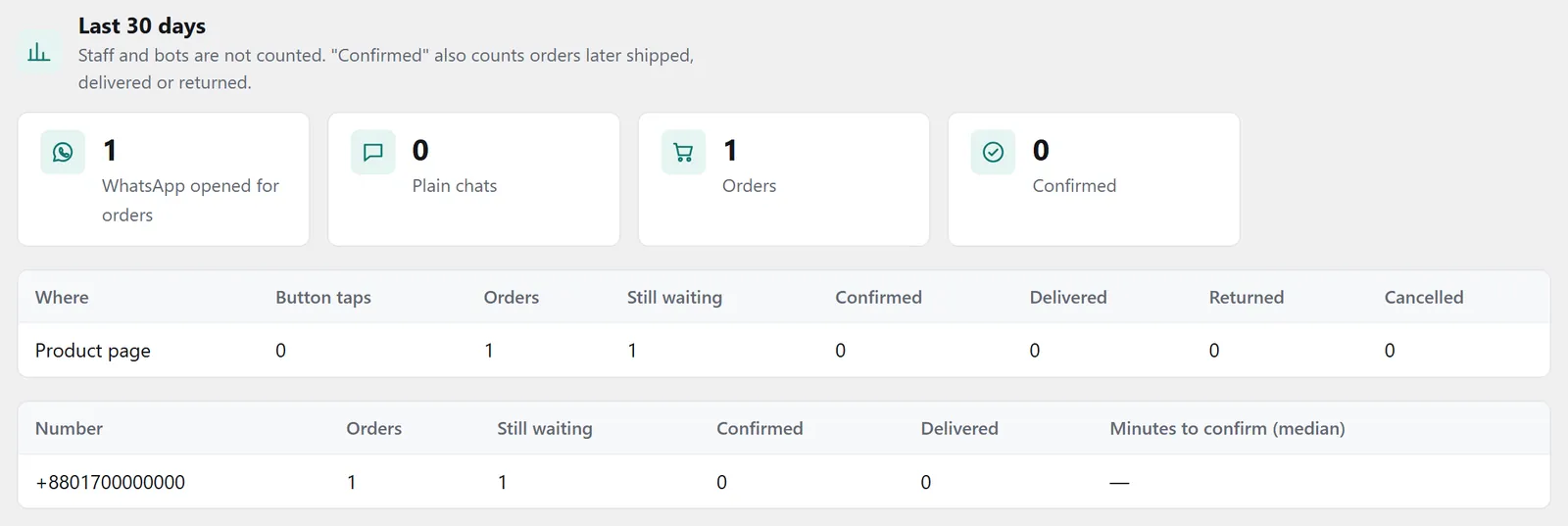
Last 30 daysAt the very bottom of the page, four figures: how many times WhatsApp was opened for an order, how many plain chats, how many WhatsApp orders, and how many of them are now confirmed or further along. Staff and robots are not counted.
Below them, two tables. The first goes by place: product page, phone bar, cart, shop cards and checkout, each with how often it was pressed, how many orders, how many waiting, confirmed, delivered, returned and cancelled. The second goes by number: how many orders each number got, how many were confirmed and delivered, and how many minutes confirming usually takes.
Tips
What works- Match the rate names. With delivery rates named “Inside Dhaka” and “Outside Dhaka”, the customer never has to pick a rate separately.
- Take orders outside hours too. With the default choice, night-time customers still order and know when they will hear back.
- Share the work when there are several of you. Use categories, days and hours to decide who gets which orders; give more weight to whoever handles more.
- Keep the WhatsApp pending tab empty. The report shows, number by number, how many minutes confirming takes.
FAQ
WhatsApp OrderWhat if the customer never sends the WhatsApp message?
The order is already in your shop, in the WhatsApp pending tab. By default one follow-up goes after 30 minutes: a call if you have AI Call, and an SMS if you switched it on. You can phone them yourself too.
Is the ad tracking kept?
Yes. The order goes through your own checkout, so which ad it came from and what goes to Meta are the same as for any other order.
What happens if someone presses the button at night?
By default the order is taken and the customer sees when you will reply, such as “tomorrow at 10 am”. You can hide the button outside hours instead.
Do WooCommerce's order emails go out?
In the WhatsApp pending status, WooCommerce's own “New order” and “Processing” emails are not sent. News of a new order comes through the Nishchit app, and the order waits in its tab on the desk.
Do offer prices reach the message?
Yes. The order and the message carry the cart's real price, Offers prices included. If that differs from the total the form showed, the customer is shown the new total and asked to press again.
Price: This add-on is ৳75 a month. Three or more add-ons cost ৳199 in all. The first payment covers only the days left until the licence renews; after that it comes with the renewal bill. How billing works
Add-ons run with a Nishchit WooCommerce plugin licence. No plugin yet? see the licence prices, or start with the 7-day trial.