Add-on guide · ৳75 a month
Smart Upsell: “Frequently bought together” for WooCommerce
This WooCommerce upsell plugin from Nishchit learns from your delivered orders which products customers really take together and keep. Then it shows exactly those on the product page, cart, checkout, thank-you page and the order desk.
With cash on delivery, an extra item only pays when the parcel is accepted. Many shops' “frequently bought together” is either hand-picked or random. Smart Upsell looks at which two products people really took together and kept; a pair that keeps coming back together drops down.
What you need: your statuses matched to Delivered and Returned under Nishchit → Order statuses, and some delivered orders. Until pairs form, the boxes show your own picks, best sellers and new products.
What the customer sees
In five placesProduct page: under the Add to cart button, “Frequently bought together”: up to three products, each with a tick box, picture, name and price. Once something is ticked, a line below says “the ticked ones go into the cart too” and how much it adds. The ticked items go into the cart only when the customer presses the shop's own Add to cart, each as its own line.
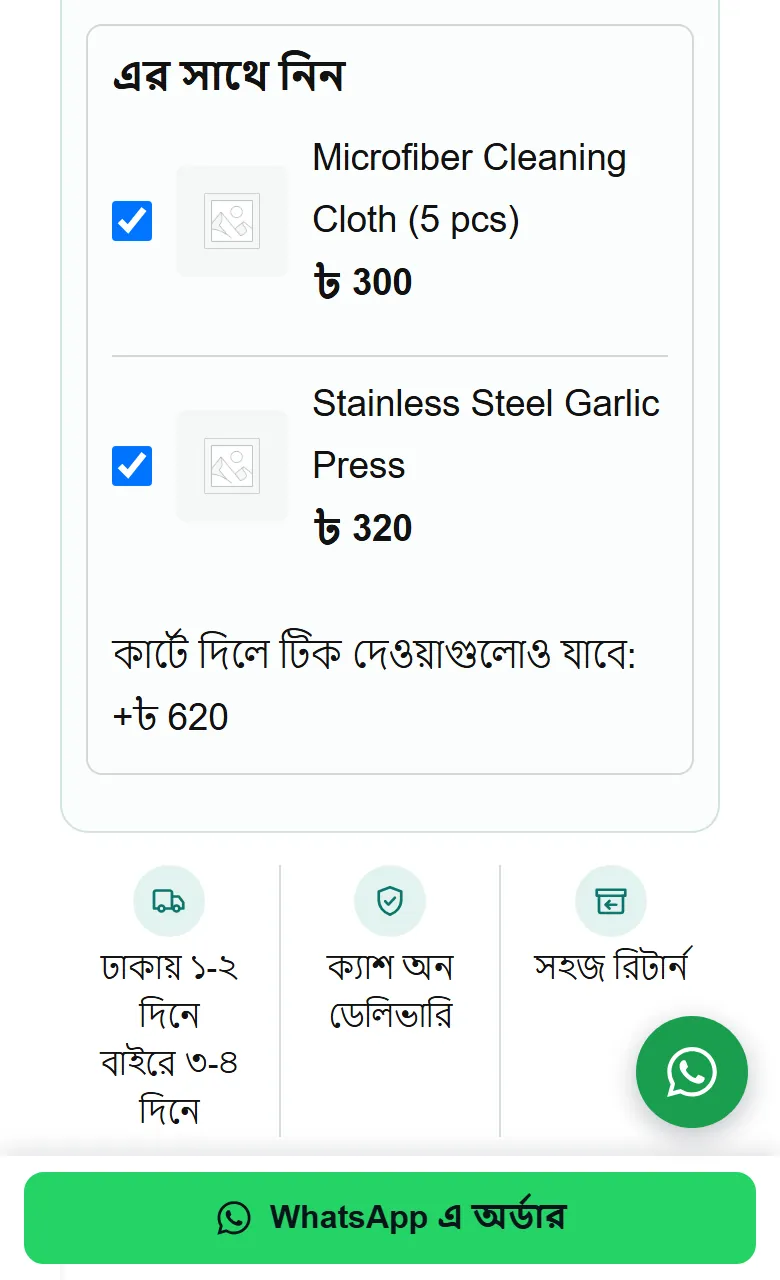
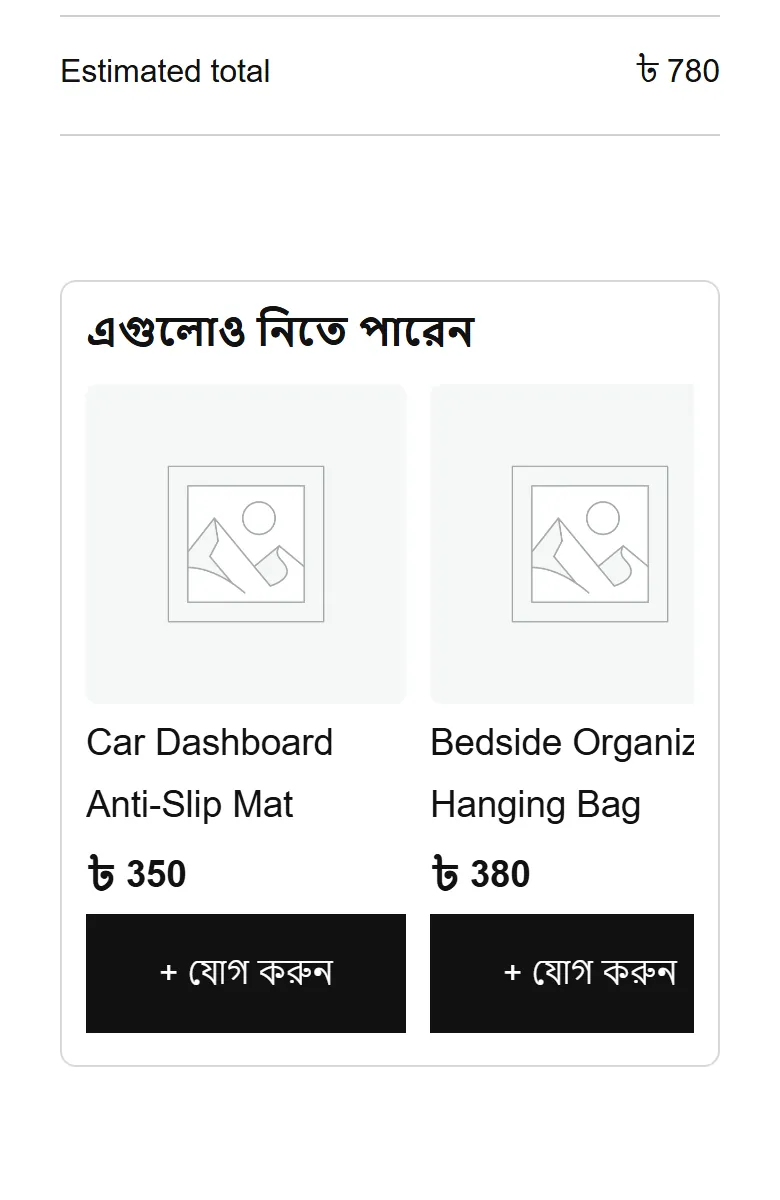
Cart: under the cart, “You may also like these”: up to four cards, each with “+ Add”. Pressing it reloads the page with the product in the cart.
Checkout: one product above the order button, with a tick box: “Yes, add this too”. Ticking puts it in the cart and the total updates at once. Only on the standard (classic) checkout; the block checkout does not show it.
Thank-you page: “Add to the same parcel — no delivery charge”, up to two products. Under each it says what the total due on delivery becomes if it is added. Pressing “Add” puts the product into the same order, the delivery charge stays the same, and for 10 minutes “Undo” takes it back off.
This offer shows only when the order is cash on delivery (or an advance was taken), has not been booked with a courier yet, is still new or confirmed, and the customer's number has a good record. An order can take one add, once.
Order desk: while making a new order or editing one, chips under the lines: “Often bought with these”. Pressing a chip adds one piece of that product; nothing is added unless someone presses.
- What is suggested: only standard (simple) products that are in stock and have a price. Products with sizes or colours, and products on backorder, never come up, because the box has to add them in one press.
- What does not come up: products already in the cart or order, and products over the price limit (step 5 below).
- Price: always the product's normal price, one piece. Smart Upsell itself gives no discount.
What customers see starts out in Bangla, and the box headings can be changed in the settings. On this page their words are shown in English.
Setup
Steps 1–6-
1
Switch the add-on on
On the Nishchit → Add-ons page, switch on this add-on's card and save, then press Open settings. The add-on's own page has a switch at the top too, which also turns it on and off.
It first learns about a minute after you switch it on, then every night at 3:15 by your WordPress site's clock. The What it learned section shows when it last learned and when it will next, plus a few numbers: how many settled orders it read, your delivery rate, how many orders had two or more products, and how many pairs it has learned. To see a changed setting take effect now, press Learn again now.
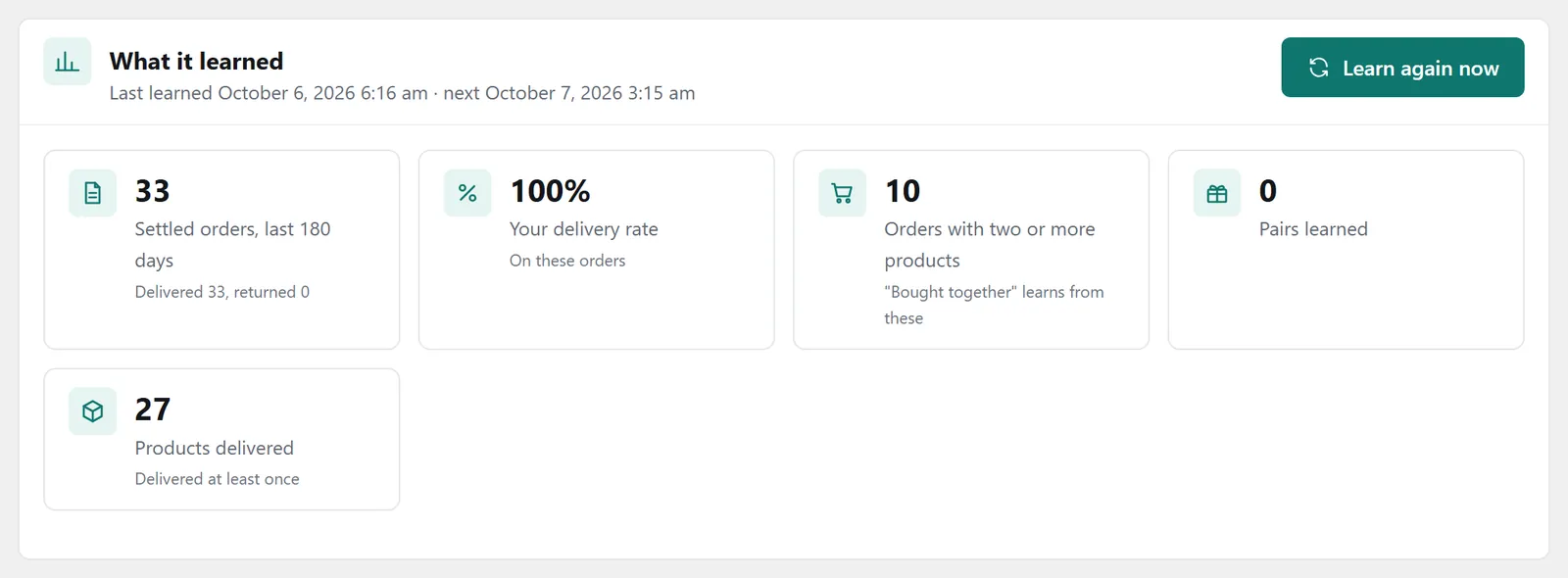
The “What it learned” panel: last and next learning, the learning figures and “Learn again now” -
2
Where it shows
Five ticks, all on to start with: product page, cart, checkout bump, thank-you page and order desk. Where there is no tick, no box shows.
If your site uses a page cache (such as WP Rocket), switch on My site has a page cache. The product-page box then loads after the page opens, so even a cached page never shows yesterday's stock.
-
3
What the boxes say, and how many
What the boxes say: the product-page heading (“Frequently bought together”), the cart heading (“You may also like these”), the checkout bump's bold line and the line under it, and the thank-you page heading. Save a box empty and the original text comes back.
How many to show: 3 on the product page (1 to 6), 4 in the cart (1 to 8), 2 on the thank-you page (1 to 3) and 4 desk chips (1 to 8). The checkout bump always shows one.
The line under the checkout bump says “It comes in the same parcel, no extra delivery charge”. If your delivery charge goes up with quantity or weight, change that line.
-
4
Your own pairs
A new product has no deliveries yet, so there is nothing to learn. Pick for it yourself: edit the product, and in Product data → Linked Products use the Bought together (Smart Upsell) field for up to 12 products. These show before the learned pairs.
WooCommerce's own Up-sells and Cross-sells count as hand-picked too (setting WooCommerce Up-sells and Cross-sells, on). The cart then hides WooCommerce's own cross-sell box, which would otherwise show the same products twice.
-
5
Safety: what is never suggested
Highest add-on price (%)Default 50: up to half of what is being bought. On a ৳1,000 purchase, up to ৳500. The desk has no such limit.
Leave out weak products (points)Default 10. If the shop's average delivery rate is 80%, products under 70% are left out, as long as they have at least 5 settled orders. Your own picks are never left out this way.
Lowest record for the thank-you offer (%)Default 60. If the customer's number has delivered less than this with your shop or on courier records, the thank-you offer does not show. Blacklisted and red-flagged numbers are left out anyway.
When all your products cost about the same, the product-page box can stay empty. At a 50% limit, nothing at ৳300 comes up beside a ৳500 product. On a shop like that, set the limit to 100 or more.
-
6
Stopping on its own when returns rise
Pause a place when returns rise is on to start with. If orders with add-ons from a place come back 5 points or more above orders without add-ons (say 15% instead of 10%), showing stops there and you are told in the desk and app notifications. It looks at the last 14 days, at least 50 settled orders, at least 10 of them with an add-on from that place. The desk never pauses.
A paused place is marked “Returns are high, so it is paused”. To start it again, tick “Resume” there and save; orders from before that no longer count.
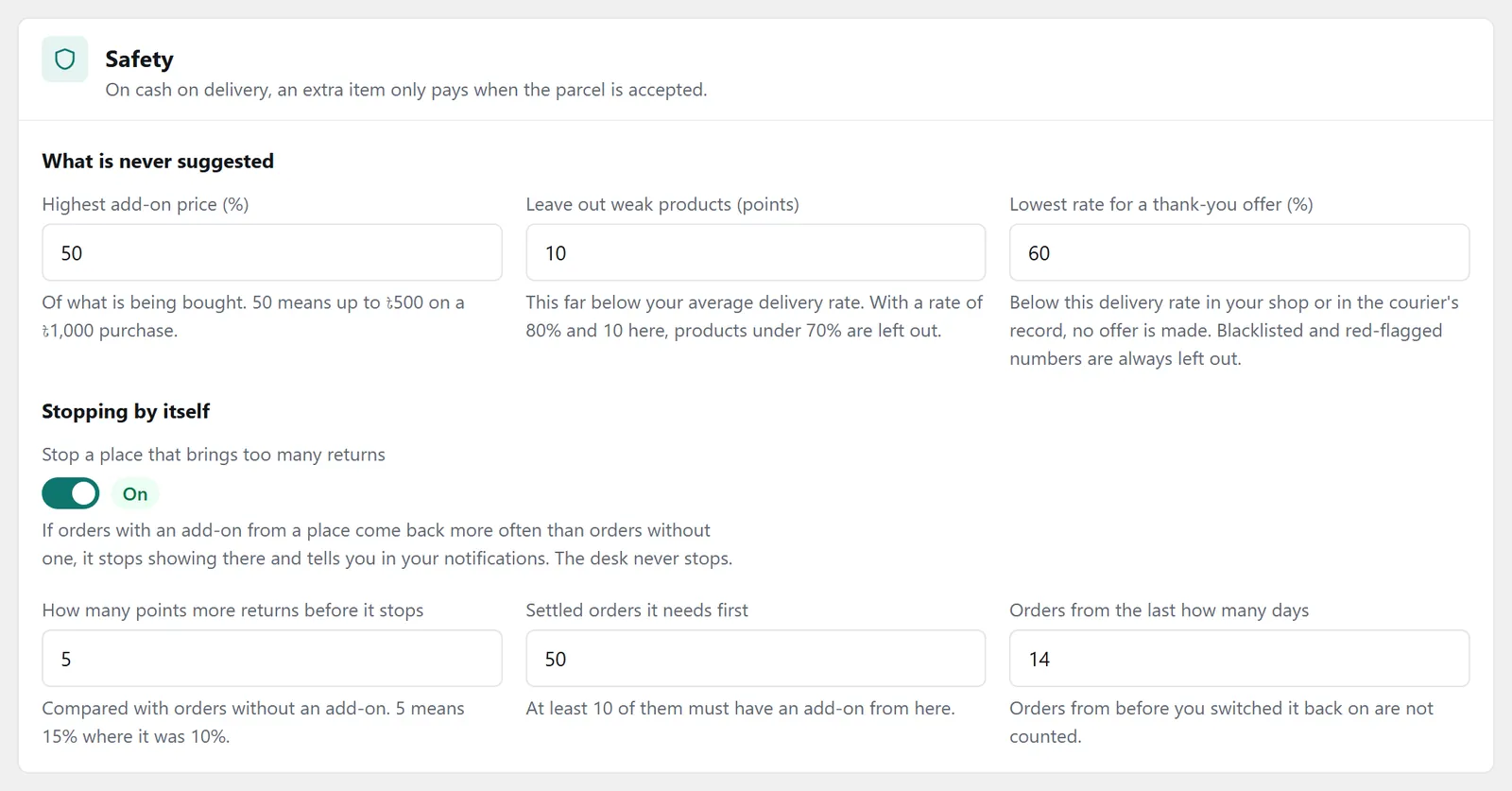
The “Safety” panel: price limit, weak products, the thank-you offer's record and the self-pause rules
How it learns
Nightly- Which orders it reads: those whose status is Delivered, partly delivered or Returned, from the last 180 days. Cancelled, new and in-transit orders are not read.
- Pairs come from deliveries: two products are a pair once they have been in at least 3 delivered orders together. Orders returned with both count against the pair.
- Recent orders weigh more: an order's weight halves every 60 days, so last Eid's combo slowly moves aside.
- Boxes fill in this order: your own pairs, learned pairs, best sellers in the same category, the shop's best sellers, and new products last.
These numbers (180 days, 60 days, 3 orders) can be changed in “How it learns”. A change takes effect from the next learning, or right away with “Learn again now”.
What the report shows
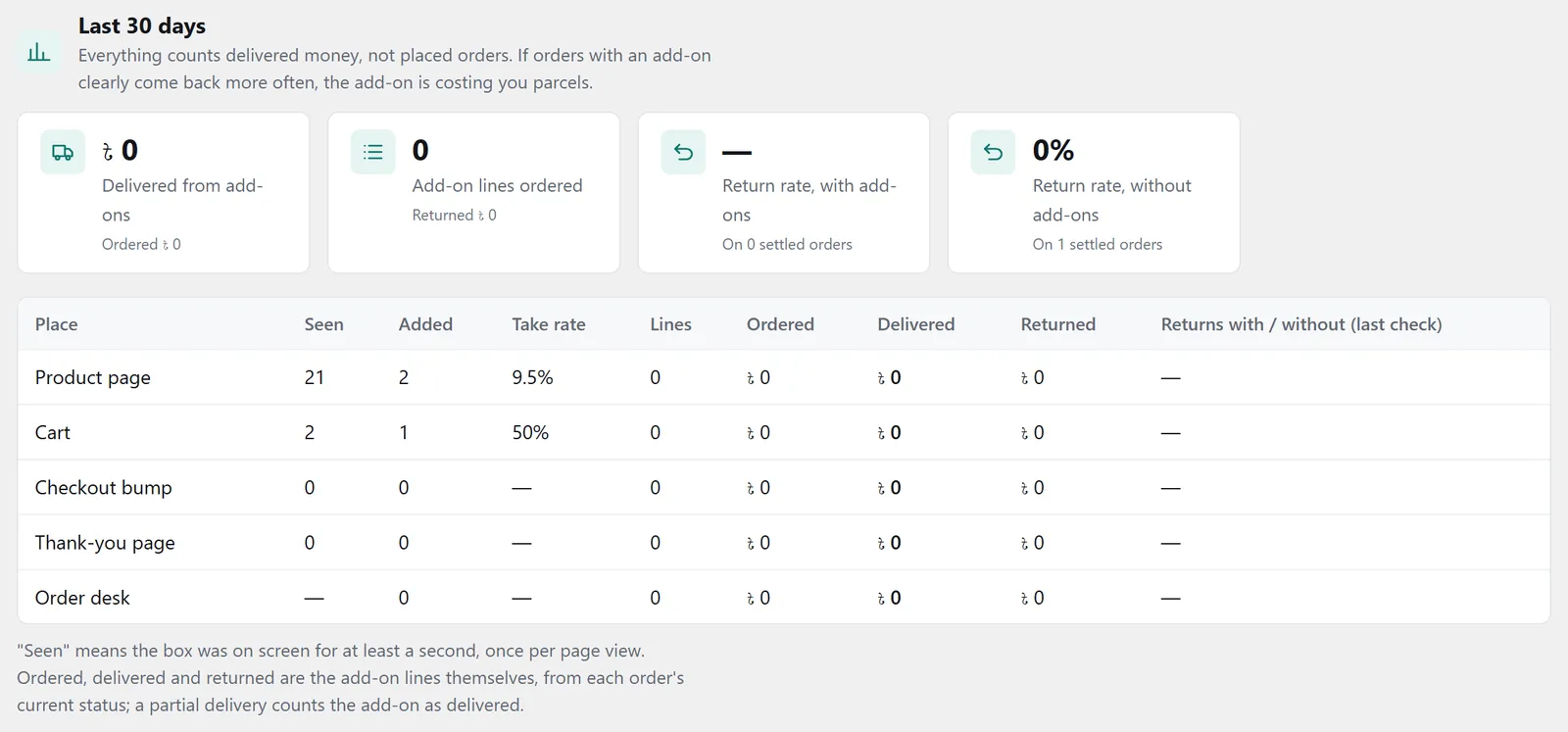
Last 30 days, in delivered moneyHow much money in add-on lines was delivered. Underneath: how much was ordered.
How many add-on lines were ordered, and how many of them came back.
The two side by side. If orders with add-ons come back clearly more, the add-ons are spoiling parcels.
The table below takes each place in turn: how often the box was seen (at least one second on screen, once per page view), how often something was added, the take rate, and how many of those lines were delivered and how many came back. Under it, which source filled the boxes (your picks, learned pairs, best sellers, new products), and the ten pairs customers kept most.
Tips
What works- Keep the status matching right. Without Delivered and Returned matched there is nothing to learn; a red notice shows at the top of the page.
- Pick for new products yourself. Learned pairs only come after deliveries; picks made in Linked Products show from the first day.
- Raise the limit when prices are close. If the product-page box is empty, check “Highest add-on price” first.
- Watch the return rate, not just the adds. More adds with more returns is no gain; that is what the self-pause rule is for.
FAQ
Smart UpsellWill it show pairs on the day I switch it on?
It first learns about a minute after you switch it on, and two products only become a pair once they have been in at least 3 delivered orders together. Until then the boxes show your own picks, best sellers and new products.
Why is the product-page box empty?
Usually the price limit: by default nothing over half the product's price comes up. Also left out: out-of-stock products, products with sizes or colours, and products already in the cart.
Does a product added on the thank-you page become a separate order?
No. It goes into the same order and the same parcel, and the delivery charge does not change. A note goes on the order so the new total can be mentioned on the confirmation call.
Can the customer add something after the courier is booked?
No. Once the courier's consignment number is on the order, or the order has moved on from new or confirmed, the thank-you offer no longer shows.
Why has a place paused itself?
Orders with add-ons from there came back clearly more often than orders without add-ons. The top of the page says by how much and over how many orders. If you decide to, tick “Resume” and save.
Price: This add-on is ৳75 a month. Three or more add-ons cost ৳199 in all. The first payment covers only the days left until the licence renews; after that it comes with the renewal bill. How billing works
Add-ons run with a Nishchit WooCommerce plugin licence. No plugin yet? see the licence prices, or start with the 7-day trial.