From confirmation to delivery — the whole COD cycle in one place
Auto-confirm by AI call, fraud check, courier booking, SMS, labels and profit tracking. No need to leave WooCommerce — it all runs from your phone.
The demo needs no login and nothing to install — straight into the real desk.
৳490/ month and up · 7-day trial for ৳99 · Android app included
No website, or don't want one? Nishchit Cloud — just log in, no site needed. Every plugin feature and the same app.
 Manage everything
from desktop & mobile
Illustration — names and numbers are made up. Screenshots of the real desk and app are below.
- AI auto-callOrders confirm themselves
- Courier bookingSteadfast, Pathao, RedX, CarryBee
- SMS & notificationsKeep customers updated
- Reports & profitSee what really came in
- Android appRun it from your phone
Have a website?
Nishchit comes in two forms — same desk, same app. Pick the one that fits you.
One plugin, the whole order cycle.
From the order coming in to the cash in your hand — every step in between happens here.
Ten minutes. Three steps. Live.
No API keys, no copy-paste.
Install the plugin
Upload the zip file and activate. The setup wizard checks compatibility itself — it tells you up front what's needed and what's missing.
Connect couriers and your phone
Turn on couriers and SMS in the wizard. Scan the QR code on the last step with the app and your phone is connected — no API keys, no copy-paste.
Start working
As soon as orders start coming in, you get a push on your phone. Confirm, fraud check, send to courier — all from there.
Worried about setup? If you get stuck, we'll set it up for you — just tell us on WhatsApp.
The wizard checks for itself what's needed and what's missing.
When an order comes in, the customer gets a call — press 1 to confirm
When a new order comes in, Nishchit calls the customer itself within a minute, in your shop's name. If the customer presses 1, the order confirms itself; if they press 2, they talk to you. Nobody picked up? It calls again. Know who will really take the parcel before you send it.
- An automatic call for every new order — neither you nor your staff has to pick up the phone
- Press 1 and the order is Confirmed; the history reads «Customer confirmed on AI Call»
- No answer? It calls again three times, two minutes apart, then the order lands on your list
- A greeting in your shop's name — we record it and set it up for you
- When calls go out, and when pressing 2 puts the call through to you — you set the hours
A single return costs about ৳100 in courier charges and packing. At 300 orders a month, AI calls cost about ৳597 in total — so stopping just 6 returns a month pays for it.
Cost: Pay as you go has no monthly fee, ৳1.99 a minute; or Starter, ৳390 a month with 50 minutes free — only when the customer answers, ৳0 when they do not. You choose the package later on the plugin's AI Call page. See the three packages
| Orders | Customers | Amount | AI call | |
|---|---|---|---|---|
| #1042 | Rakib Hasan | ৳1,250 | Confirmed on AI Call | ⋮ |
| #1041 | Sumaiya Akter | ৳890 | Calling… | ⋮ |
| #1040 | Tanvir Ahmed | ৳2,100 | Will call again… | ⋮ |
| #1039 | Mim Rahman | ৳650 | Wants to talk | ⋮ |
| #1038 | Zahid Islam | ৳1,480 | Confirmed on AI Call | ⋮ |
| #1037 | Nusrat Jahan | ৳990 | Didn't answer | ⋮ |
Before you even pick up the phone, know who sends parcels back
Next to every order, the customer's real record — how many parcels went out with which courier, and how many came back. See a risk? Ask for an advance; otherwise book it straight away. One return stopped means you save both the courier charge and the product.
- Delivery records across all couriers, by phone number
- Your own shop's history, shown separately
- Blacklist, and duplicate orders from the same number within seven days
| Courier | Total | Delivered | Returned | Rate |
|---|---|---|---|---|
| SSteadfast | 8 | 3 | 5 | 37% |
| PPathao | 3 | 1 | 2 | 33% |
| RRedX | 2 | 0 | 2 | 0% |
| CCarrybee | 0 | 0 | 0 | — |
| In your shop | 2 | 0 | 2 | 0% |
Stop the bad order — before it happens.
Every other safeguard kicks in after the order is placed. By then it's already in your books, your pixel, your stock — and in your head as a sale.
Customer orders → you open it, check it, call → cancel. The order still stays in your books.
The number is checked the moment they tap “Place order” — your own history, and courier records if needed. If it doesn't clear the bar, the order never happens.
You decide what happens when it doesn't clear the bar
-
1
Block the payment methodCOD off, prepaid only. They can still buy — just not at your risk.
-
2
Ask for an advanceYou decide what percentage of the order. Most shops ask for just the delivery charge — if it comes back, at least that is covered.
-
3
Turn it awayIf it should never be accepted, it never becomes an order. It doesn't enter your books either.
Stop just one return and the month's cost is covered.
Ten-minute setup. Full refund within seven days if you don't like it.
Every order in one table — and one tap gets it done.
A table like a Google Sheet — but it lives inside your shop, so whatever you change lands on the real order. No need to judge from pictures — you can open the desk below and try it right now.
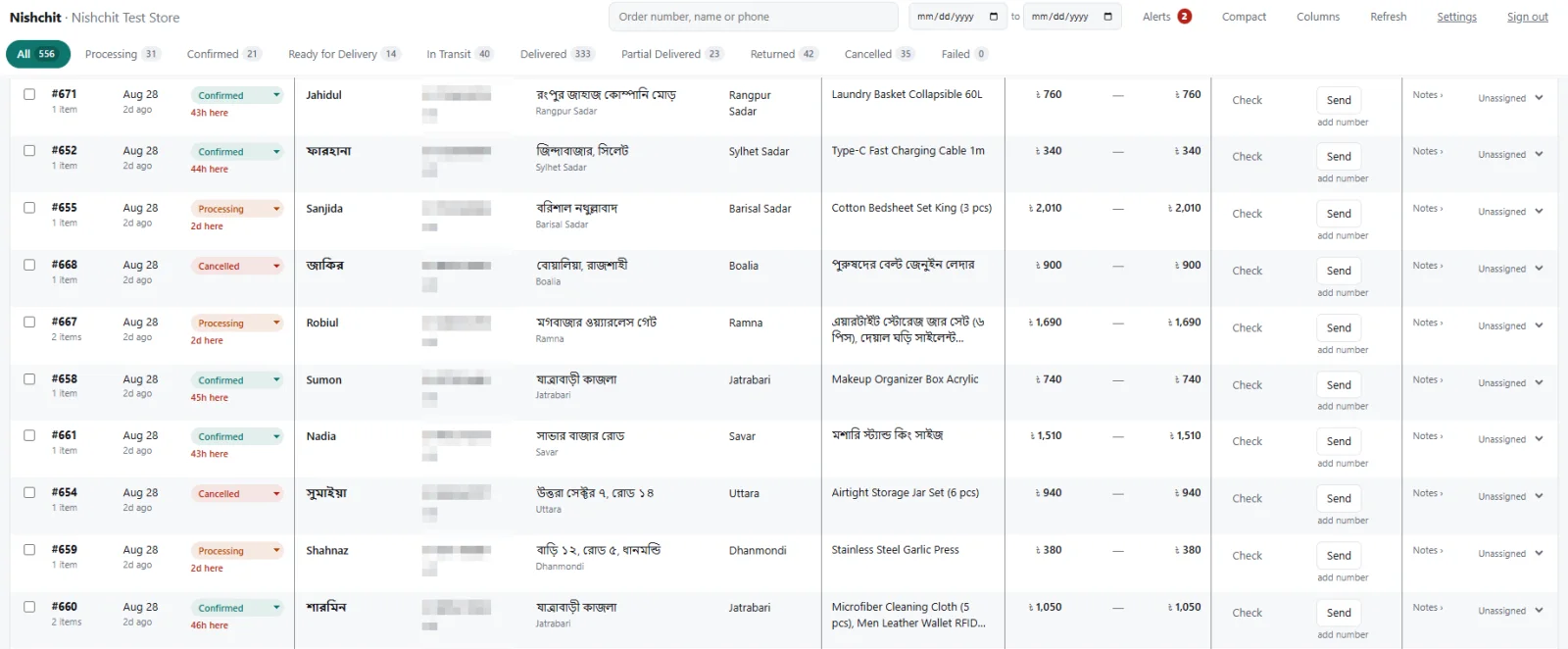
In WooCommerce, changing an order's status reloads the whole page —
two seconds of waiting every time. In Nishchit, one tap and it's done.
200 orders a day, each touched three times — that waiting alone costs
20 minutes a day, ten hours a month.
No login, nothing to install · tap whatever you like, nothing gets saved
- One tap, doneChange status, search, switch tabs — no waiting, no spinner. On WooCommerce's orders page you wait for the page to reload after every click.
- Status tabsProcessing, Confirmed, Ready, In transit — how many orders are in each, shown at the top. One click opens that list.
- Edit right from the rowStatus, note, advance — no need to open the order. Whatever you change saves instantly.
- Fraud check right thereTap Check and the customer's courier record shows in that same row. You know before you pick up the phone.
- Courier from the same placeTap Send and the parcel is booked; the consignment number comes back and sits in that same cell.
- Zone and moneyThana from the address, and each order's total, advance and balance due — in separate columns.
- Your table, your wayYou choose which columns to see, and Compact fits more orders on one screen.
-
This screenshot is from a test shop, with the phone number column blurred. In the demo, all names and numbers are made up — there's no real customer data in it. Laptop, tablet and phone — the same data in all three places, at the same time.
Two or three shops? Still one app.
If you run more than one website, you don't need a separate app for each. Your shops sit side by side in the left menu — switch in one tap. Each shop's orders, stock, reports and settings stay separate; one phone, one login.
- Shop name at the top of each pushSee which shop got the order without opening it
- Switch shops in one tapThe app opens on the shop you were last in; staff can add shops too
- Each shop kept separateEach site has its own licence, same price — if one expires, only that one stops; the rest keep running
- No limit on shopsOne licence per website. There's no limit on how many shops you add to the app.
- NNoor Fashionnoorfashion.com.bd12 new›
- Gadget Ghorgadgetghor.com3 new›
- Home Decor BDhomedecorbd.shop0›
Your whole shop in your pocket.
No need to open a computer. From taking orders to handing them to the courier, fraud check, stock and accounts — all on your phone. The screenshots below are from the real app.
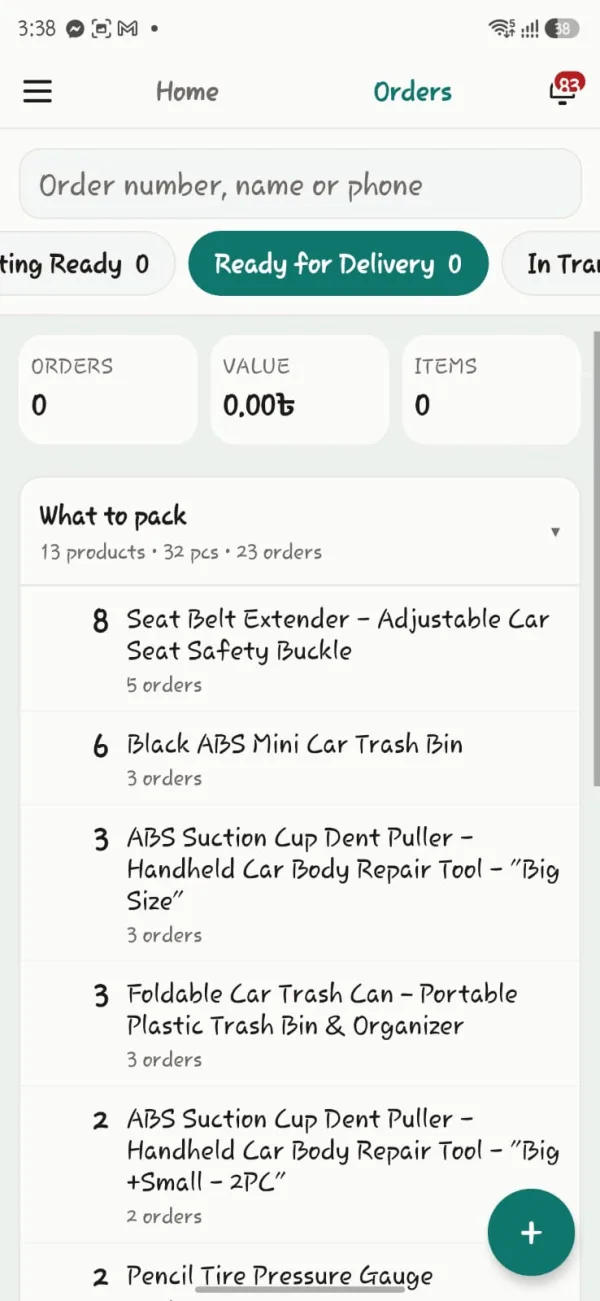
What to pack today, already counted
Tabs by status, with the order count on each — all using your shop's own status names. Plus a packing list: how many of each product you need, and for how many orders.
- 13 products · 32 pieces · 23 orders — exactly the list you need in the warehouse
- Today's orders, money and item count at the top
- Search by name, number or order number — any of them works
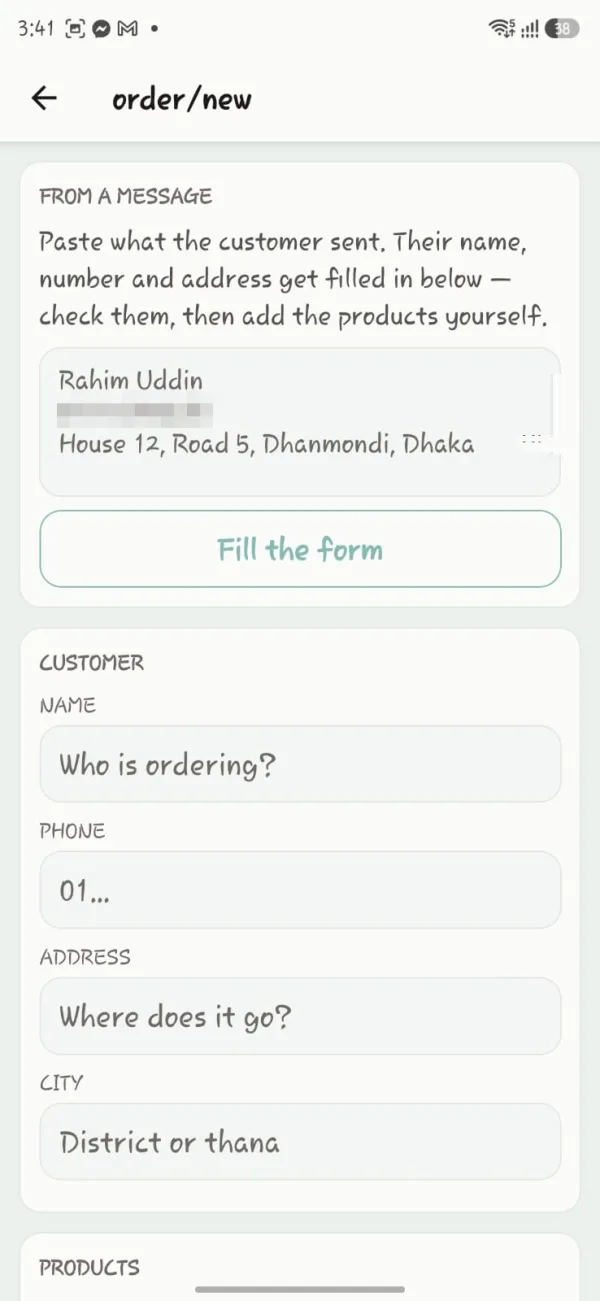
Paste the message, and the form fills itself
Cash-on-delivery orders come in on Messenger or by phone — name, number and address all in one paragraph. Copy it and paste it in; the app works out which part is the name, which is the number and which is the address.
- Paste → "Fill the form" → glance over it and add the products, done
- No email or account needed — asking for those on a call only makes the call longer
- The delivery record appears the moment you type the number
These screens could be on your phone this afternoon.
Ten minutes to set up. If you don't like it within seven days, you get all your money back.
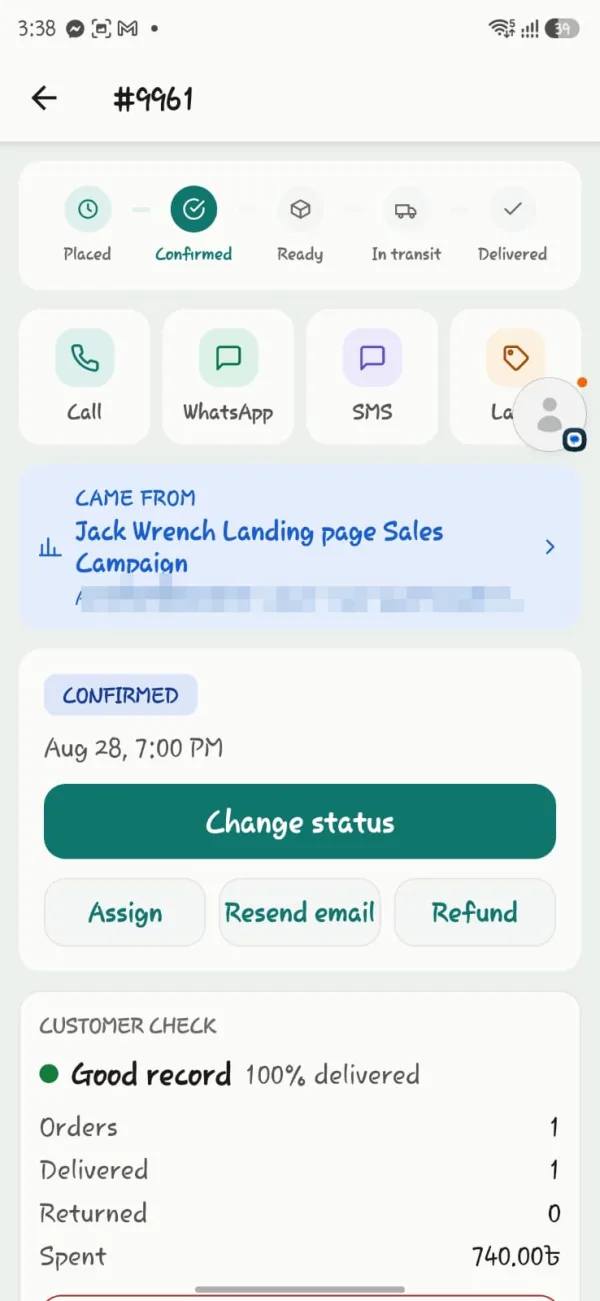
Which ad this order came from, shown right there
At the top, which step the order is at, then call, WhatsApp, SMS and label — side by side. And at the bottom, a line no other order manager has: which campaign this order came from.
- Which landing page, which ad, paid or organic — written on the order itself
- Change the status, assign staff, refund — all from the same card
- A button that isn't meant for your staff simply doesn't show
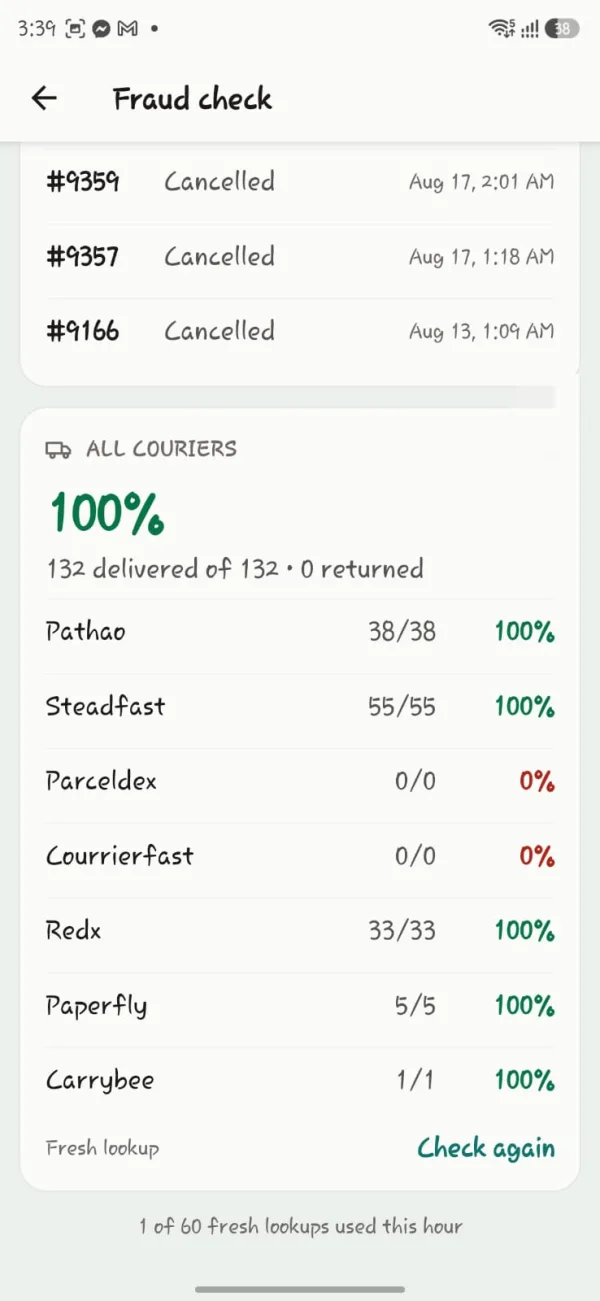
Before you take the order, check the number
A call or a message comes in — the only question is whether to take the order at all. Type the number and you get every courier's record, plus your own shop's cancelled orders on that number.
- Pathao, Steadfast, RedX, Paperfly, Carrybee — how many went out, how many came back
- Your shop's cancelled orders on that number, by date — nobody else has this information
- How many of this hour's 60 checks are used, shown right on screen
What else is right on the phone
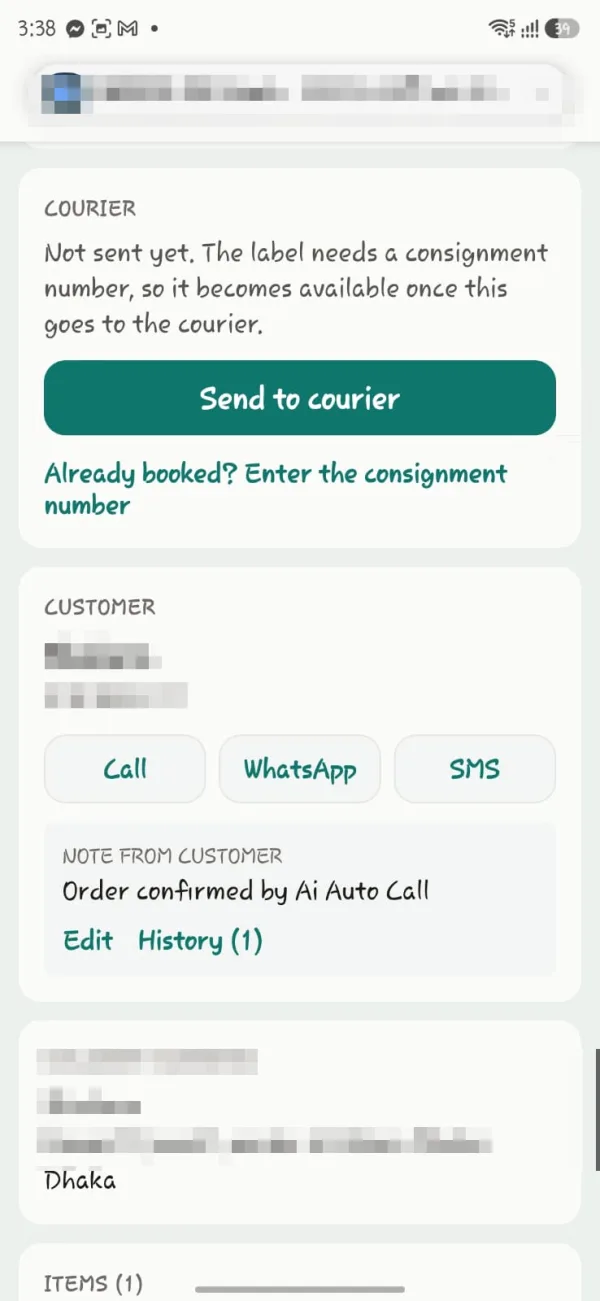
Send to courier
One tap to book, and the label as soon as the consignment number arrives. If you already booked it by hand, just enter the number.
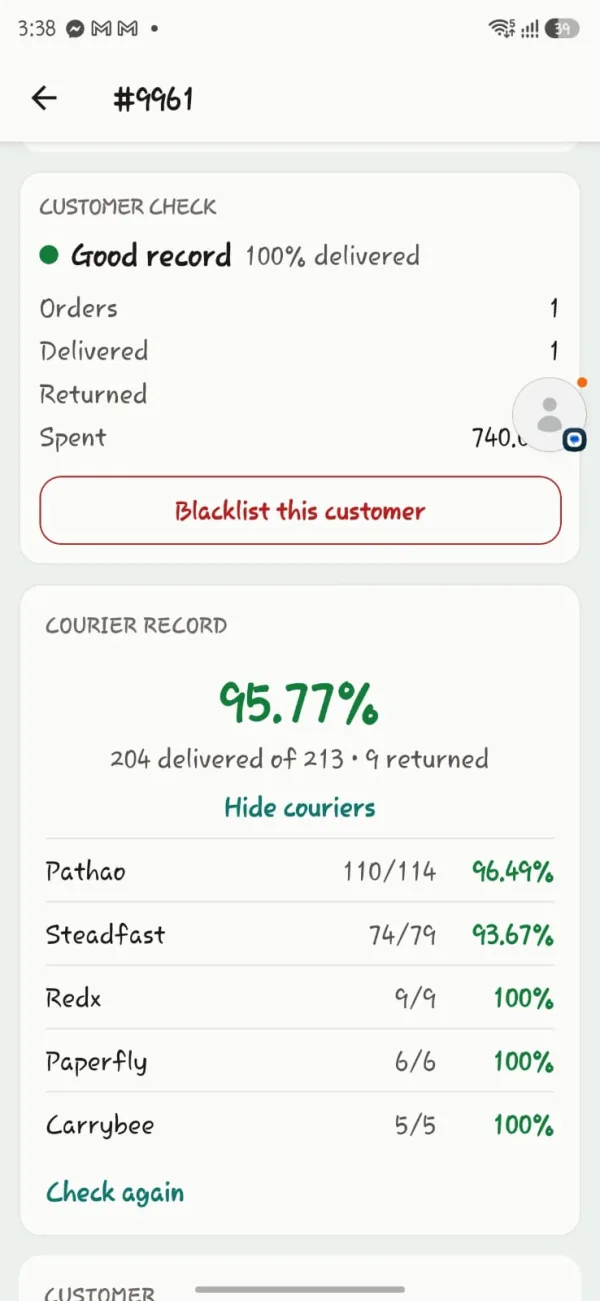
Customer record
How many orders this customer has placed with your shop, how many they kept, how much they've spent. Keeps returning? Blacklist.
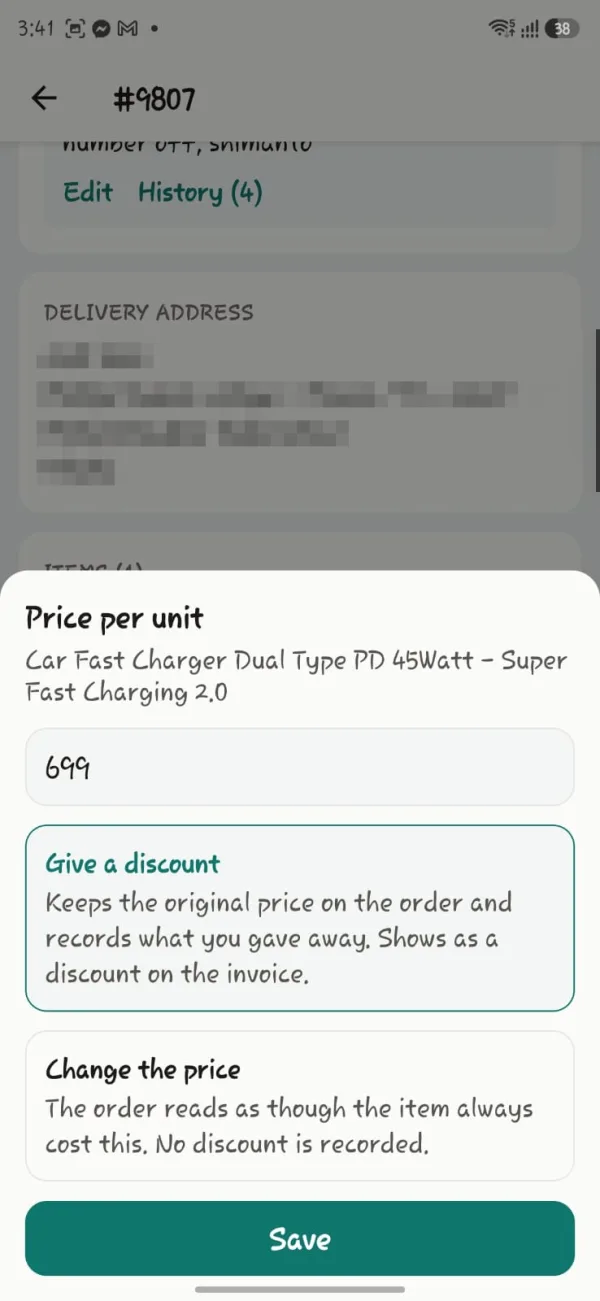
Discount, or a new price
With a discount, the original price stays and the discount shows up in the accounts. Change the price and that price becomes the real one on the order — the two are kept separate.
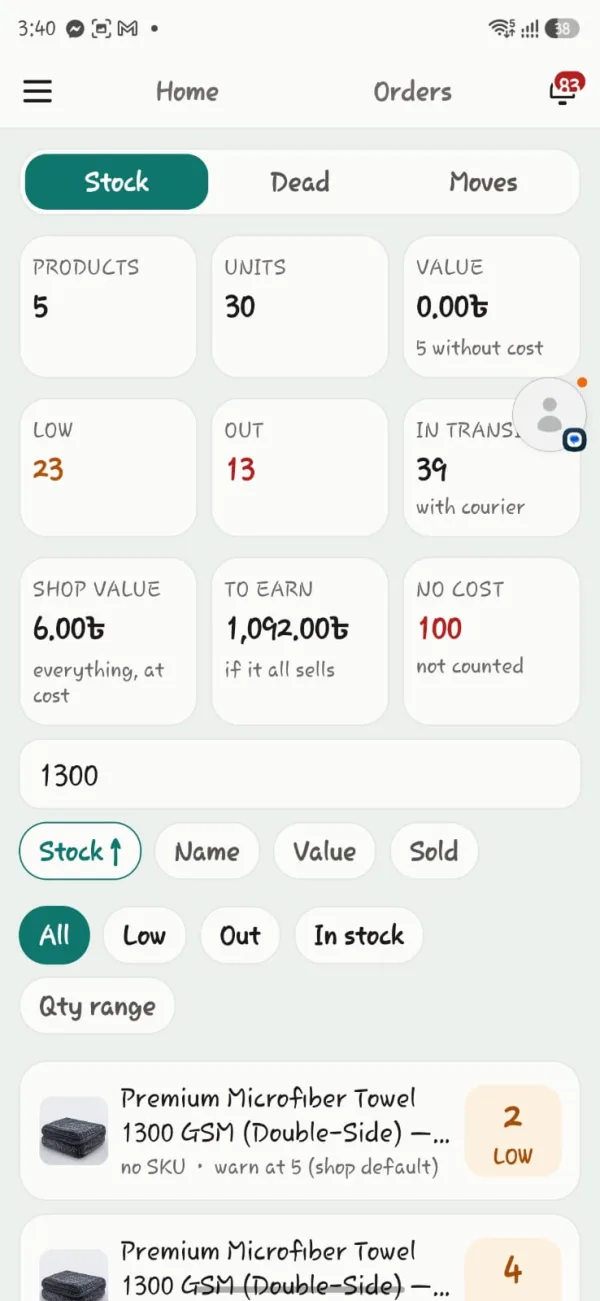
The whole warehouse, counted
How many products, how many pieces, how much stock is sitting there at cost price, and what it will bring in if it all sells.
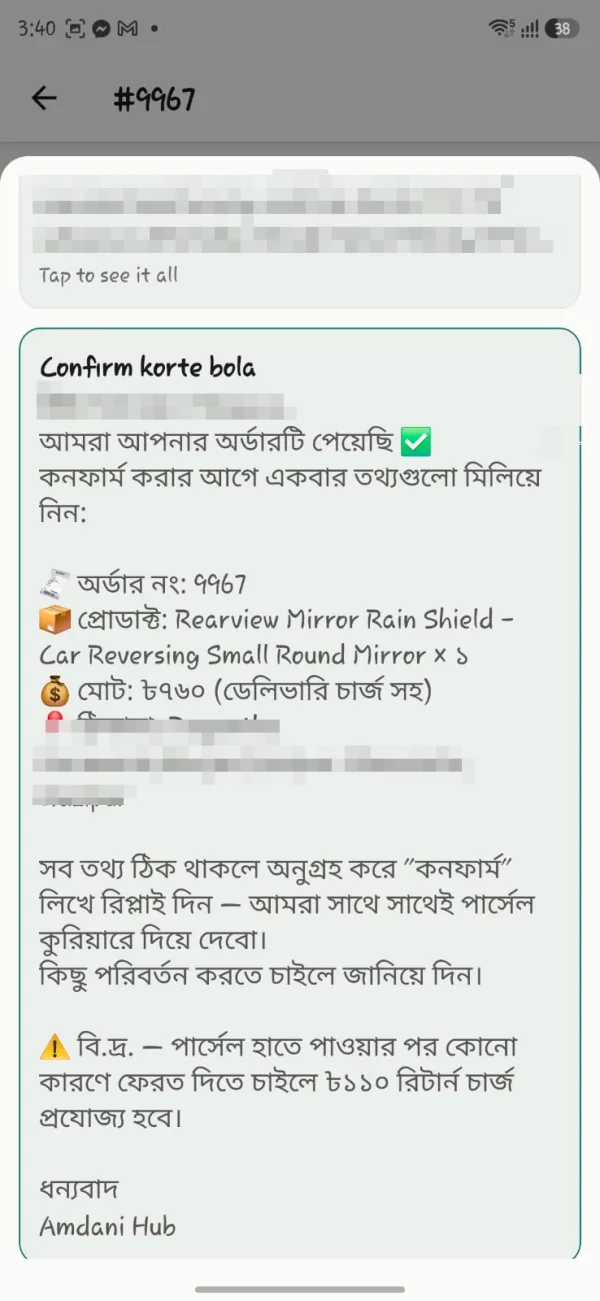
Written in Bangla
What goes to the customer is in Bangla, under your shop's name. Order number, products and address are filled in.
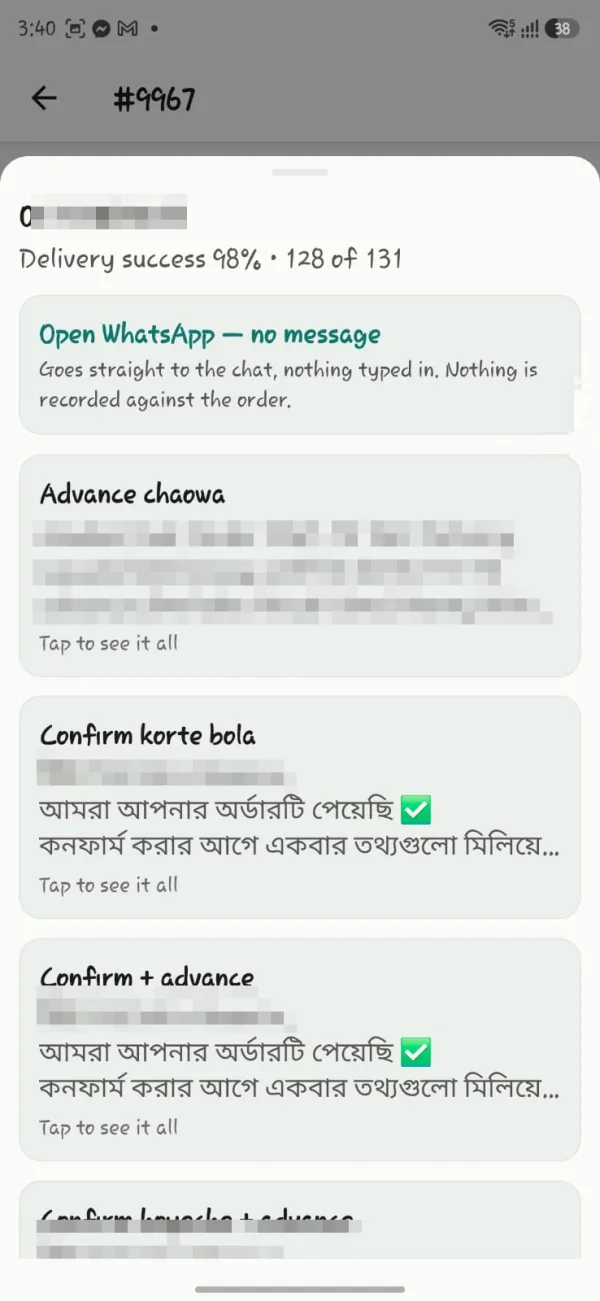
Messages ready-made, just send
Right above the template, that number's delivery success — 98%, 128 of 131
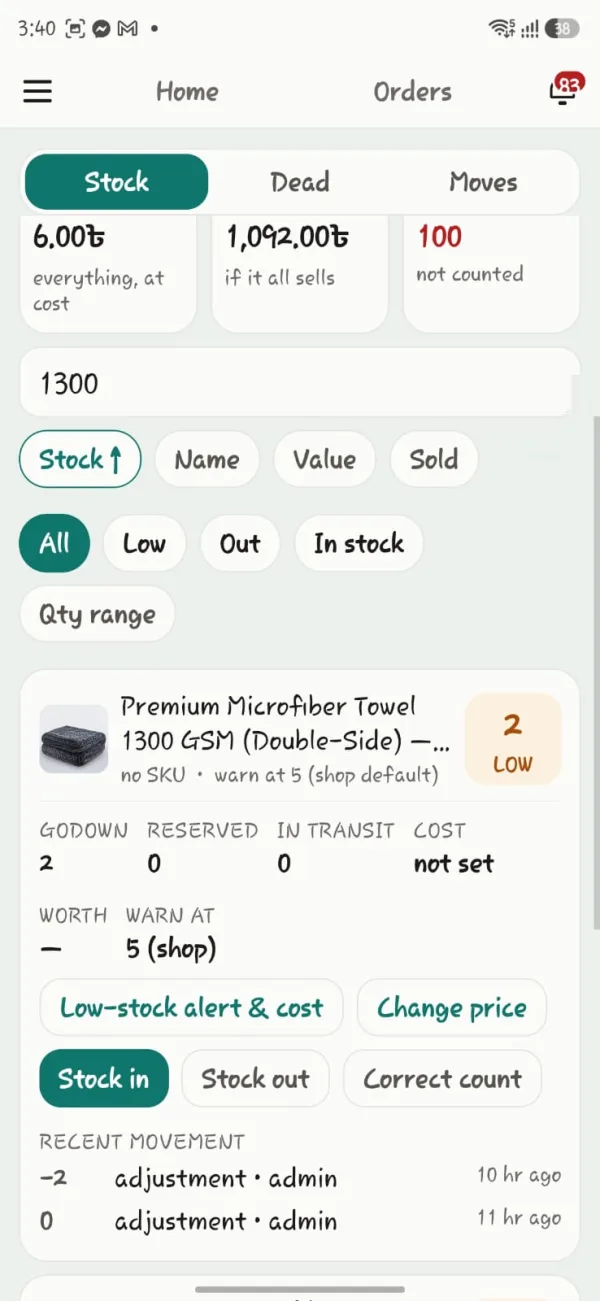
Four numbers, not one
How many in the warehouse, how many reserved, how many with courier — and how many are actually left to sell
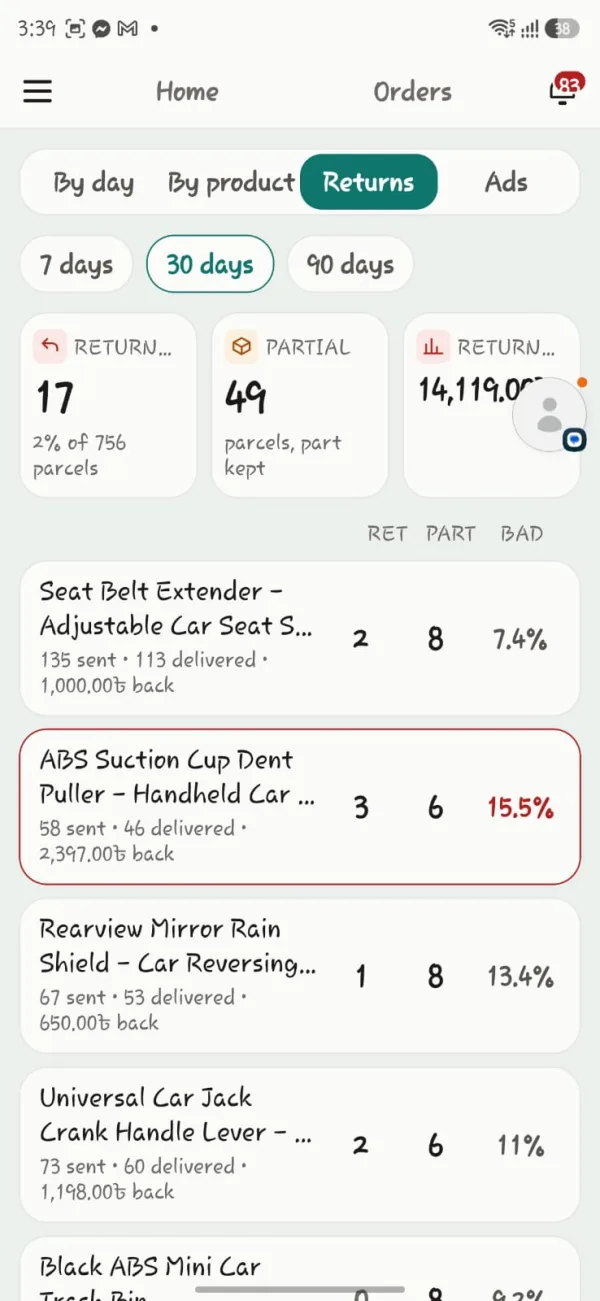
Which product is eating your money
Full returns and partial returns kept apart — they are not the same thing
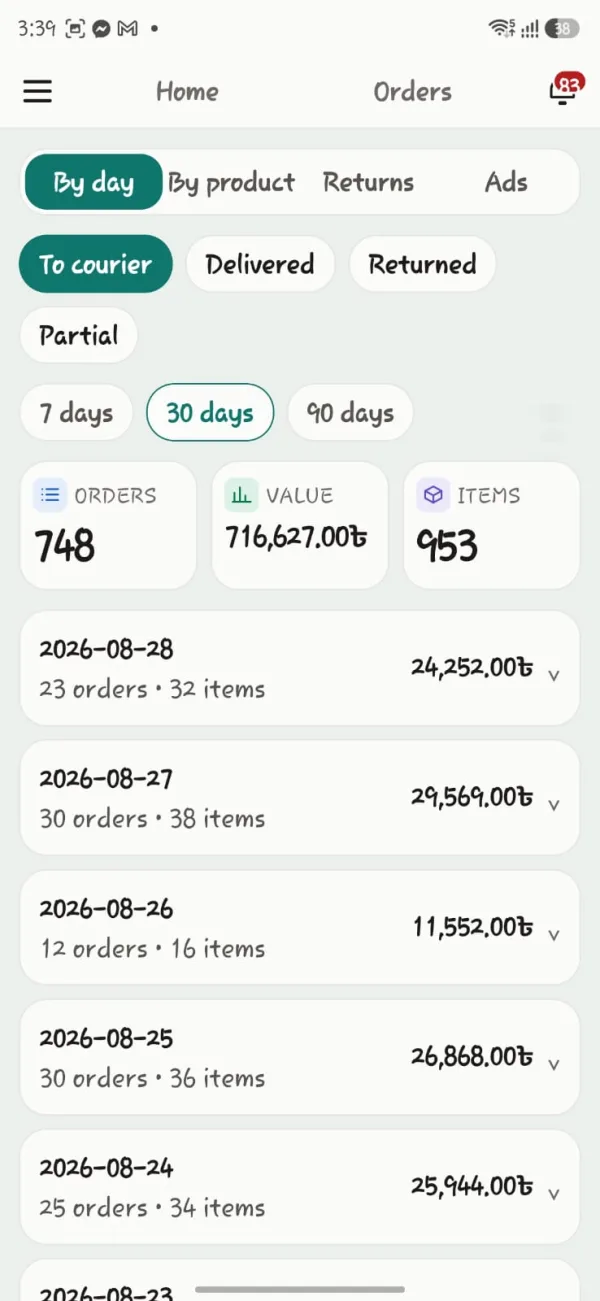
How many went to courier each day
WooCommerce only keeps the current status — the plugin writes its own log of what changed and when
The pictures above are from the real app, using a live shop's own orders. Customer names, numbers and addresses have been blurred. Android app, showing the same data as the web dashboard at the same time. iOS is coming.
Learn by watching — all in Bangla.
Each video teaches one task, in a few minutes. From setup to fraud check, courier, SMS — all of it.

A full tour of the order desk
Tabs, search by name, number or order number, advanced filters, products and quantities right in the row, changing the status of many orders at once — the whole computer desk in one video. Plus fraud check, courier booking, labels and invoices.

Installing the plugin and the licence key
Getting the plugin zip and licence key from your account, uploading and activating it in WordPress, pasting the key for the green tick — from zero to running.

Order status setup
How your shop's statuses become tabs on the desk — Processing, Confirmed, Ready, In transit — and deciding once which one means which step.
Every plan has every feature. The only difference is how many orders a month.
Pay monthly, pay yearly, or pay once. You'll never have to work out which feature you'd lose.
Last chance Everything in the Unlimited plan, now ৳490, 80% off. When the offer ends, the price goes back to ৳2,490.
Buy now and this same price stays at renewal too. Ends at midnight on 28 October 2026.
Starter
For small shops
৳4,900/ year
Works out to ৳408 a month · 2 months free
300 orders a month
- Every feature, nothing locked
- Unlimited staff
- One domain
- Support and updates on WhatsApp
Growth
About 25 a day
৳9,900/ year
Works out to ৳825 a month · 2 months free
750 orders a month
- Every feature, nothing locked
- Unlimited staff
- One domain
- Support and updates on WhatsApp
Business
About 50 a day
৳16,900/ year
Works out to ৳1,408 a month · 2 months free
1,500 orders a month
- Every feature, nothing locked
- Unlimited staff
- One domain
- Support and updates on WhatsApp
Unlimited
No limit on orders
৳24,900 ৳4,900/ year
Works out to ৳408 a month · 2 months free
No order limit
৳20,000 less · ৳24,900 after the offer
- Every feature, nothing locked
- Unlimited staff
- One domain
- Support and updates on WhatsApp
- In your own shop, on real orders
- Every feature open
- As many orders as you like
- Pay as you go ৳1.99 / minuteNo monthly fee — pay only for the talk. Pressing 2 does not ring your number; you call back
- Starter ৳390 / month50 minutes free, then ৳0.99 / minute
- Business ৳690 / month100 minutes free, then ৳0.79 / minute
Example: a month with 300 orders, 210 calls answered, each under a minute — on Pay as you go about ৳418; on Starter ৳390 + 160 minutes × ৳0.99 = about ৳548. Under about 340 minutes of talk a month Pay as you go is cheaper; above it, Starter or Business.
Choose a package on the plugin's AI Call page to switch it on, and change it later. Shops already on ৳390 a month + ৳0.69 a minute keep that price. A monthly fee (if any) comes out of the call balance; top-ups from ৳100, by bKash, card or bank. Minutes count only when the customer answers — ৳0 when they do not. Each started minute counts (a 40-second call is one minute); on Starter and Business that includes time the customer spends talking to you after pressing 2. On Pay as you go, pressing 2 does not ring your number — the customer hears “Thank you. Our representative will contact you very soon.”, a note goes on the order, and you call back. Free minutes do not carry over to the next month. To know more, call 09639-333322
More than 1,500 orders a month? Tell us on WhatsApp — we'll look at your numbers and set a price.
Six more tools when you need them — ৳75 a month each
Every plan feature is already yours. To sell more, add these on their own — from inside the plugin, in one click. And the Buy Now button is free for everyone.
Buy them in the plugin: WordPress → Nishchit → Add-ons → «Get it». The first payment covers only the days left until the licence renews; after that they are added to every renewal. A yearly licence pays 10 months — one add-on is ৳750.
What it would cost bought separately
At current market prices, per month.
Bought separately, a month costs ৳5,000. With Nishchit, ৳490.
No need to buy five separate things — it's all in one
- Order managerOrder desk, inline editing, bulk actions
- Fraud checkerCourier-wise delivery record from a phone number
- Courier pluginOne-click booking, consignment tracking
- SMS panelOrder SMS, templates, log and reports
- Label pluginBarcode labels, picking sheets, invoices
Whatever's on your mind.
What do I need to use it?
A WordPress site with WooCommerce installed — that's all. With WooCommerce 8.2 or later it works on the new order storage (HPOS) as well as the old one. And an Android phone for the app.
Do I need a special loader or extension?
No. Some plugins need ionCube Loader switched on at your host — Nishchit doesn't. Upload the zip, activate it, and you're done.
How does SMS work?
You don't need to buy a panel from a separate SMS company. Top up credit right here, and SMS goes out for everything from order confirmation to courier updates. Bangla text counts 70 characters per SMS — you'll see the cost as you type.
Which couriers are supported?
Steadfast, Pathao, RedX and CarryBee — all four. Pick orders and book in one click, the consignment number fills itself in, and each order goes with whichever courier suits it. Nothing extra to buy.
Can I use it on more than one website?
One licence covers one domain — a second shop needs a second licence, at the same price. In the app both shops live together: open the menu and they're side by side, one tap to switch.
How do updates arrive?
On WordPress's own updates screen, like any other plugin. No need to download the file and upload it again.
What if I don't like it?
Tell us within seven days and you get a full refund. No questions asked.
What's support like?
Directly on WhatsApp, not a bot. From setup to any technical problem — 9 am to 10 pm.
Nishchit
Let today's orders get done today.
Don't like it within seven days? Full refund. Setup takes ten minutes.
মিটিং বুক করুন
নাম, নম্বর আর পছন্দের সময় দিন — সাথে সাথে কনফার্মেশন SMS পাবেন।