Plugin update · 7 and 8 October 2026
Nishchit 1.6.54 and 1.6.55: what's new
Seven paid add-ons and a free one — the new Cloud Connect among them, a way to spot orders that come through a VPN, a new order form on WhatsApp, a great deal of work to fit the themes, and quite a few calculations put right.
Version 1.6.54 of the Nishchit WooCommerce plugin came out on 7 October 2026, and 1.6.55 the next day, on 8 October 2026. Both are on this page, and every section says which version it belongs to. The biggest news is add-ons: features you switch on one by one as you need them, inside the plugin, with no other plugin. In 1.6.55, Cloud Connect joined them.
How to update: In the WordPress admin, go to Plugins and, under Nishchit, press Update now. Updates arrive there by themselves; there is no separate file to download — press it now and 1.6.55 comes straight away, with everything from both versions. But before you press it, check two things.
New: add-ons
Seven paid, one freeYou will find them all on the Nishchit → Add-ons page. Each one switches on and off on its own, and while it is off nothing of it shows in your shop. Under each name is the name the plugin's Bangla screens give it, in English. The six paid ones and the free Buy Now came in 1.6.54, Cloud Connect in 1.6.55.
- Cloud Connect Your site and the cloud on one desk Connects the site to your Nishchit Cloud shop: orders, products and stock flow to the cloud, and several sites are run from one desk. New in 1.6.55. ৳75 / month per site
- Offers Buy more, save more A lower price for more (for example 1 for ৳549, 2 for ৳999), combo packs, cart discounts and free delivery above a set amount. The price is applied by itself. ৳75 / month Read the guide
- Smart Upsell Take them together It learns from delivered orders which products people buy together, then shows exactly those on the product page, the cart, the checkout and the thank-you page. ৳75 / month Read the guide
- Restock Alerts Tell me when it is back Customers leave their number on a sold-out product and get an SMS with the link when it is back. Before a new number joins the list, a code goes to it by SMS, so nobody can put in someone else's number. ৳75 / month Read the guide
- Pre-Orders Pre-order Take orders with an advance before the goods arrive. The orders wait in their own status; when the goods arrive, one press on the desk confirms them all. ৳75 / month Read the guide
- WhatsApp Order Order on WhatsApp The “Order on WhatsApp” button first makes a real order in your shop, with the duplicate and fraud checks, then opens WhatsApp with the order number. ৳75 / month Read the guide
- Floating Checkout Popup order form A floating cart on every page, and a four-field order form right on the page: name, mobile, address, area. Orders go through your real checkout. ৳75 / month Read the guide
- Buy Now Buy now An “Order now” button on product cards and product pages. Pressing it orders only that product; the rest of the cart is kept. Free Read the guide
Cloud Connect: the new add-on in 1.6.55, ৳75 / month per site
From the cloud you can change an order's status, correct the customer's details, add a product, change a quantity or a price, write a note, take a new order and book the courier. Each of them runs through your site's own rules, so SMS, AI Call, Meta and the courier behave exactly as they would if the work had been done on the site.
It comes with no cloud shop — a Nishchit Cloud plan is bought separately. It is not inside the ৳199 bundle and is not counted towards it either: always ৳75 a month per site, and 10 months on a yearly licence, ৳750 a year per site. When one licence covers several sites, each site is paid for separately. Buy it from the plugin's Add-ons screen, and the full rules are on the add-ons page.
Paying for add-ons
With your licence, or month by month- Pricing
- One add-on is ৳75 a month. Three or more cost ৳199 a month in all, so the fourth to the sixth are added at no cost. On a yearly licence you pay 10 months for the year: one is ৳750, three or more ৳1,990. Buy Now is free and is not counted here.
- With your licence
- The first time, you do not pay a full month, only the days left until the licence's next renewal (never less than ৳10). After that the add-on joins the licence's renewal bill and renews with it.
- Month by month
- If you prefer, pay for it separately each month instead of adding it to the licence bill. The order page shows both totals, and you choose there. If you do not press “Pay next month” before the month ends, only the add-on stops; the licence keeps running. On a lifetime licence, add-ons always work this way.
- Cloud Connect is separate
- This add-on from 1.6.55 sits outside the sums above. It is ৳75 a month per site, it never joins the bundle and is not counted towards it, and when a licence covers several sites, each site is paid for separately. On a yearly licence it is 10 months, like the other add-ons: ৳750 a year per site.
- When you cancel
- On the add-on's card, press Cancel. It runs until the date it is paid to, then stops, and is not billed again. If you change your mind before then, press Undo. Only the shop owner can cancel.
The full rules and a worked example are on the add-ons page.
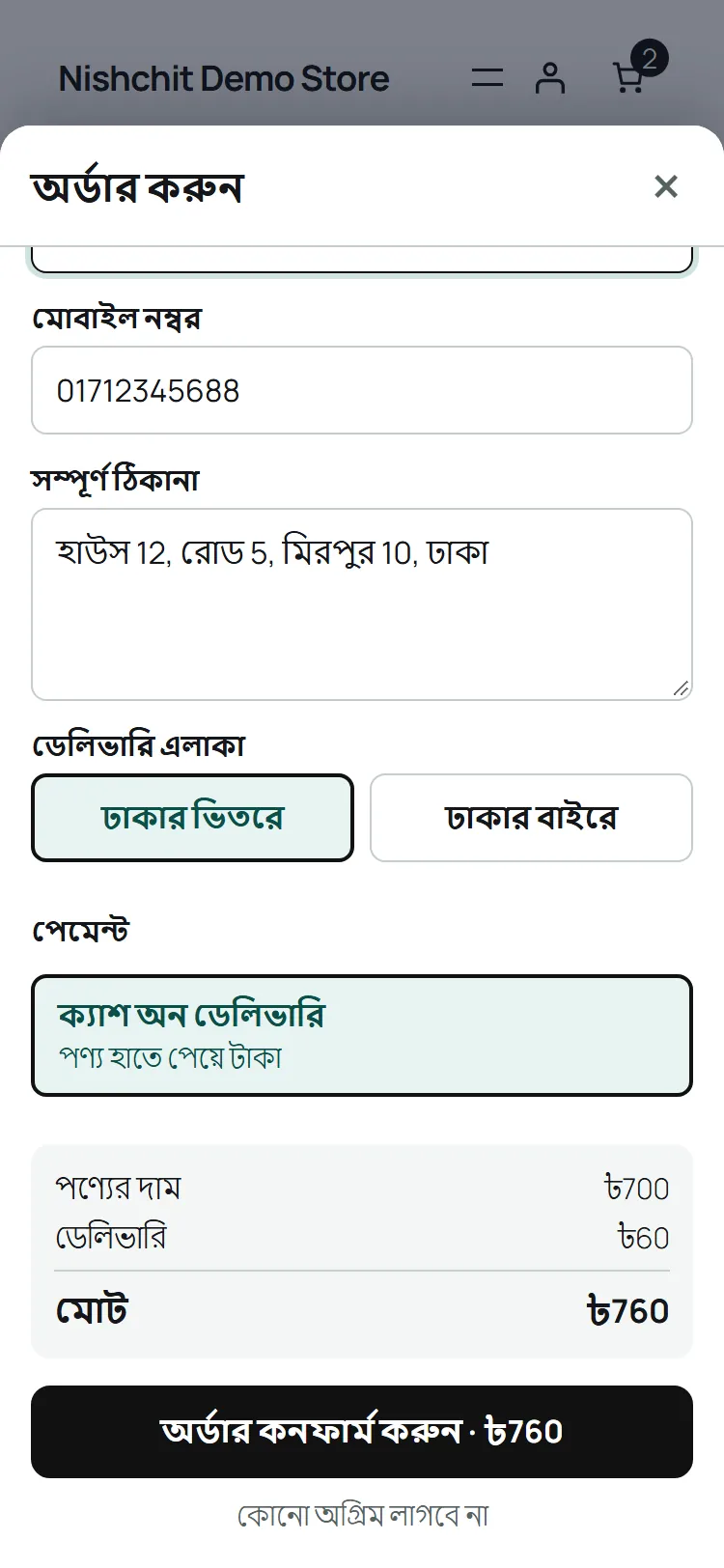
The WhatsApp order form is now the popup form
1.6.55, 8 October 2026Until now the “Order on WhatsApp” button opened a small order form, while the popup order form had much more in it. From 1.6.55 they are one and the same form: the same cards, two columns on a computer, the quantity box, the note box with its quick answers, the up-sell tick, how much the offer saves, why the delivery charge is what it is, the total on the button itself, and your own notice under it.
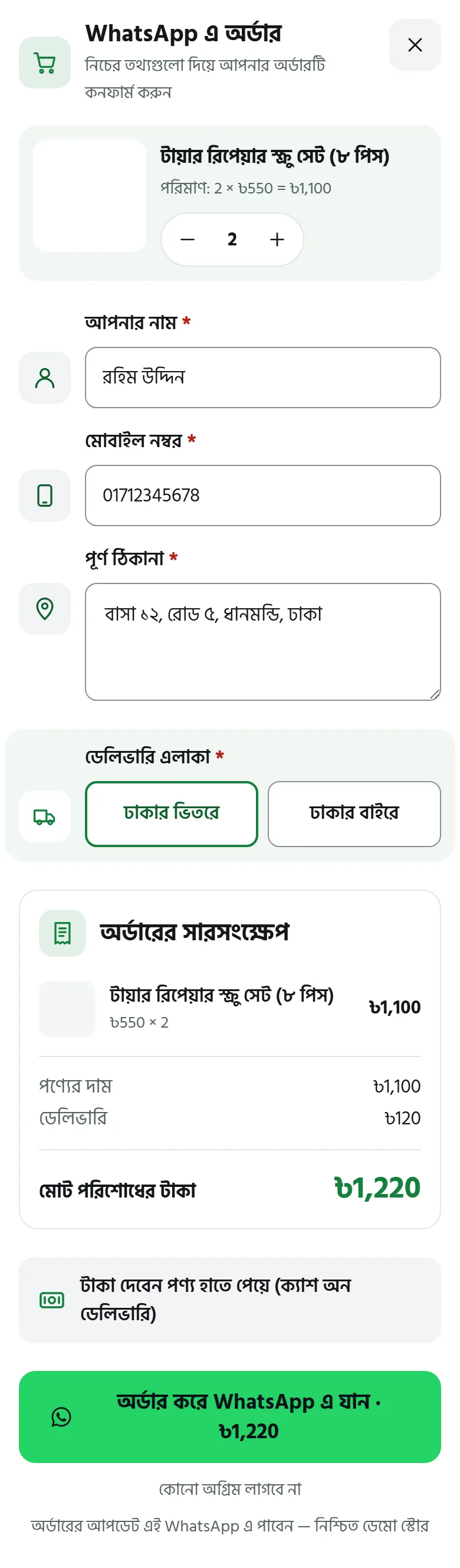
Where the order goes has not changed: as before, the order is made in your shop and WhatsApp opens.
Fitting the themes
In 1.6.55, a great deal of workThe shop was gone through on Astra, Kadence, Blocksy, GeneratePress, OceanWP, Storefront and block themes, and Nishchit's buttons, cards and boxes were matched to the theme. What changes in your shop:
- The card's “Order now” looks like the theme's own button. “Order now” on a product card is now the same width and the same height as the theme's own “Add to cart”, and it shows on a phone — on Kadence it used to appear only under the mouse. A pre-order card looks like the cards beside it too. On Astra the button is full width on the product page, where it used to be squeezed to about a quarter.
- Nishchit's colour is the same on every page. In theme-colour mode the colour is read from the product page's “Add to cart” and kept, so the shop page, the floating cart's drawer, the popup form and the block checkout all come in the same colour.
- Bangla on buttons is no longer broken up. Even when the theme puts space between letters or forces them all to capitals, the Bangla on Nishchit's buttons stays as it was written.
- Nothing spills out of its box on a phone. The offers table and the promise strip now stay inside the box, the page does not scroll sideways, and Bangla words are not split mid-word.
- The up-sell products are listed once. When WooCommerce's own “You may also like” shows the same products as the up-sell box, it is removed.
- The up-sell card on the block checkout too. The up-sell card now appears on the Checkout block as well, not only on the classic checkout.
- The cart popup fits one screen. There is no scrolling inside it, even on a small laptop screen.
- Pre-order quantity and button on one row. They used to break onto two lines.
- Prices and buttons can be read. The ones that looked faint on OceanWP and Blocksy have had their contrast put right.
Fixed in 1.6.55
Two things- The restock form can be tapped on a phone. Restock Alerts' boxes, button and links have been made big enough to tap with a finger on a phone.
- The campaign figures are right on HPOS shops. On a shop with High-Performance Order Storage on, the campaign figures page showed 0 orders without a campaign.
New: VPN Shield
In 1.6.54, on the Order protection pageFake orders are often placed through a VPN, so the address gives nothing away. VPN Shield looks at where the connection really comes from: a VPN or data-centre address, or an order from a Bangladeshi living abroad. Once it is on, you choose what happens for each kind: just a mark on the order, an OTP code, an advance, or putting the order on hold.
For the first 7 days it only marks orders, so you can see what it would have done before it does anything. Mobile data from Grameenphone, Robi, Banglalink and Teletalk, and iPhone's Private Relay, are never taken for a VPN. You will find it on the Nishchit → Order protection page, in its VPN Shield section.
On the order desk
In 1.6.54, everyday work- Column widths your way. Drag the edge of a column's header to change its width. Each staff member's own widths are remembered.
- One colour for your shop. Pick your shop's colour on the Add-ons page, and all of Nishchit's buttons in your shop, such as Buy Now and the popup form, come in that colour.
- “Already ordered” on incomplete orders. When a customer finishes the order from another number or another browser, link the incomplete row to that order. The row leaves the list.
- Who recovered it is written down. An order made from an incomplete one carries the note “Recovered from Incomplete — staff name”. When the customer comes back and orders on their own, that is noted separately too.
- A mark of their own for pre-orders. Orders from Pre-Orders stand out on the desk at a glance.
- The full number in AI Call's Recent calls. It now shows the customer's full mobile number, taken from the order.
Know this before you update
Two things changeThe checkout OTP code is now really sent. Before, the part that sends the code never ran, so even with OTP on, no code reached the customer. After the update, if the setting Nishchit → Order protection: Send a 4-digit code before taking the order is ticked, risky numbers will start being asked for a code, and every code is one SMS. Check your SMS balance before you update, and decide whether you want that setting.
With order protection on, orders now carry the customer's real IP, not the address of Cloudflare or another proxy. The IP on the order page and the one sent to Meta are the customer's. The “many orders from here” and OTP limits are now counted for each customer separately too: before, several customers behind Cloudflare could fall into one count and be blocked together.
What was fixed
In 1.6.54, security and calculationsBefore the release, the whole plugin was gone over closely once more. What changes in your shop:
- The popup form adds a product only once. Even with quick presses or the area changed halfway, the product goes into the cart once, the charge follows the final choice, and closing the form brings back the customer's earlier cart.
- A failed payment leaves the cart as it was. When an online payment fails or is cancelled and the customer comes back to checkout, the cart no longer changes; trying again orders what they were ordering.
- Inside and outside Dhaka charges are right. Even when a rate is named “Outside Dhaka City” (in English or in Bangla), customers inside Dhaka no longer get the outside charge.
- Pre-order payments add up. A pre-order whose advance has not been paid no longer shows as “Paid”, and the advance the customer is shown is the one that is taken.
- Limits cannot be dodged. Nobody can get past the order, OTP, stock SMS or upsell limits by sending a fake IP.
- Staff permissions are respected. An order a staff member is not allowed to see cannot be opened or linked on the desk. The CSV export has been made safe too.
- Everything works on shops with HPOS off. With WooCommerce's High-Performance Order Storage off, a customer's earlier orders, fraud history and desk searches came back empty. Now they are found by phone, name or order number, however the number is saved (01…, +880…, with spaces or dashes), and converting an incomplete order makes no duplicate.
To update, go to Plugins → Update now. Then open the Add-ons page and see which ones your shop can use.
Stuck? WhatsApp +8801977141107, or see the support page.